```
## Troubleshooting
| Problem | Cause | Solution |
|---------|-------|----------|
| `401 Unauthorized` on credential exchange | Registration token expired or already used | Contact Voltra for a new registration token |
| `401 Unauthorized` on subsequent requests | Incorrect or missing token | Verify you are using the token from the credential exchange response, not the registration token |
---
## Welcome to Voltra
URL: https://docs.voltra.com/docs/Overview
# Welcome to Voltra
Voltra is a cloud-native platform for connecting, managing, and monetizing EV charging infrastructure. Whether you are deploying a single charger or operating a fleet of thousands, Voltra gives you the connectivity, data, and business logic to run your network.
## What is Voltra?
Voltra is organized into three areas:
- **Platform** — Organizations, projects, access control, locations, security, telemetry, and data bridge.
- **EV Charging** — Charge authorization, pricing, sessions, payments, load management, demand response, OCPI.
- **Energy** — Device connectivity for batteries, solar inverters, meters. Modbus, DNP3, BACnet, MQTT, IEEE 2030.5.
## Next Steps
- Follow the [Quickstart](/docs/Overview/quickstart) to connect your first device
- Read about [Organizations and Projects](/docs/Platform/organizations) for multi-tenant setup
- Explore the [Reference Architecture](/docs/Platform/reference-architecture) for a deeper look at the platform
---
## Account Setup
URL: https://docs.voltra.com/docs/Overview/account-setup
# Account Setup
This guide walks you through setting up your Voltra account, creating your organization, and configuring your first project.
## Creating Your Account
1. Visit [voltra.com](https://voltra.com) and click **Get Started**
2. Enter your email address and create a password
3. Verify your email address
4. Complete your profile information
## Creating an Organization
Organizations are the top-level container for all your Voltra resources.
1. After logging in, click **Create Organization**
2. Enter your organization name
3. Add organization details (address, contact info)
4. Click **Create**
## Setting Up Your First Project
Projects help you organize resources within your organization. Common project structures include:
- By location (e.g., "Downtown Garage", "Airport Terminal")
- By customer (for CPO/eMSP setups)
- By environment (e.g., "Production", "Staging")
To create a project:
1. Navigate to **Projects**
2. Click **Create Project**
3. Enter the project name and description
4. Select which services to enable
## Enabling Services
Voltra services can be enabled per-project. Common services include:
| Service | Description |
|---------|-------------|
| Device Management | Core charger connectivity |
| Payment Processing | Accept payments for charging |
| Pricing Engine | Configure charging rates |
| Load Management | Balance power across chargers |
## Inviting Team Members
1. Go to **Organization Settings** > **Members**
2. Click **Invite User**
3. Enter the user's email address
4. Select their role and permissions
5. Click **Send Invite**
## Managing Organizations and Projects via API
You can also create organizations and projects programmatically.
### Create an Organization
```bash
curl -X POST https://api.voltra.com/csms/v2/organization/ \
-H "Authorization: Bearer $VOLTRA_API_KEY" \
-H "Content-Type: application/json" \
-d '{"name": "Acme Charging"}'
```
```javascript
const response = await fetch("https://api.voltra.com/csms/v2/organization/", {
method: "POST",
headers: {
Authorization: `Bearer ${apiKey}`,
"Content-Type": "application/json",
},
body: JSON.stringify({ name: "Acme Charging" }),
})
const data = await response.json()
console.log(data)
```
```python
import requests
response = requests.post(
"https://api.voltra.com/csms/v2/organization/",
headers={"Authorization": f"Bearer {api_key}"},
json={"name": "Acme Charging"},
)
print(response.json())
```
### Create a Project
```bash
curl -X POST https://api.voltra.com/csms/v2/projects/ \
-H "Authorization: Bearer $VOLTRA_API_KEY" \
-H "Content-Type: application/json" \
-d '{"name": "Downtown Garage"}'
```
```javascript
const response = await fetch("https://api.voltra.com/csms/v2/projects/", {
method: "POST",
headers: {
Authorization: `Bearer ${apiKey}`,
"Content-Type": "application/json",
},
body: JSON.stringify({ name: "Downtown Garage" }),
})
const data = await response.json()
console.log(data)
```
```python
import requests
response = requests.post(
"https://api.voltra.com/csms/v2/projects/",
headers={"Authorization": f"Bearer {api_key}"},
json={"name": "Downtown Garage"},
)
print(response.json())
```
> **See also:** [Organizations API Reference](/api/Organizations) and [Projects API Reference](/api/Projects) for full endpoint documentation.
## Next Steps
- Add your first charger with the [Quickstart](/docs/Overview/quickstart)
- Configure [Access Control](/docs/Platform/access-control) for your team
- Set up [API Keys](/docs/Getting-Started/api-keys) for programmatic access
---
## Quickstart
URL: https://docs.voltra.com/docs/Overview/quickstart
# Quickstart
**What you'll do:** Connect a charger to Voltra and query its status via API.
**Time:** 10 minutes.
## Prerequisites
- A Voltra account ([sign up](https://console.voltra.com))
- An API key ([create one](/docs/Getting-Started/api-keys))
## Step 1: Get Your API Key
Open the [Voltra Console](https://console.voltra.com) and navigate to **Settings > API Keys**. Click **Create API Key**, give it a name, and copy the generated key.
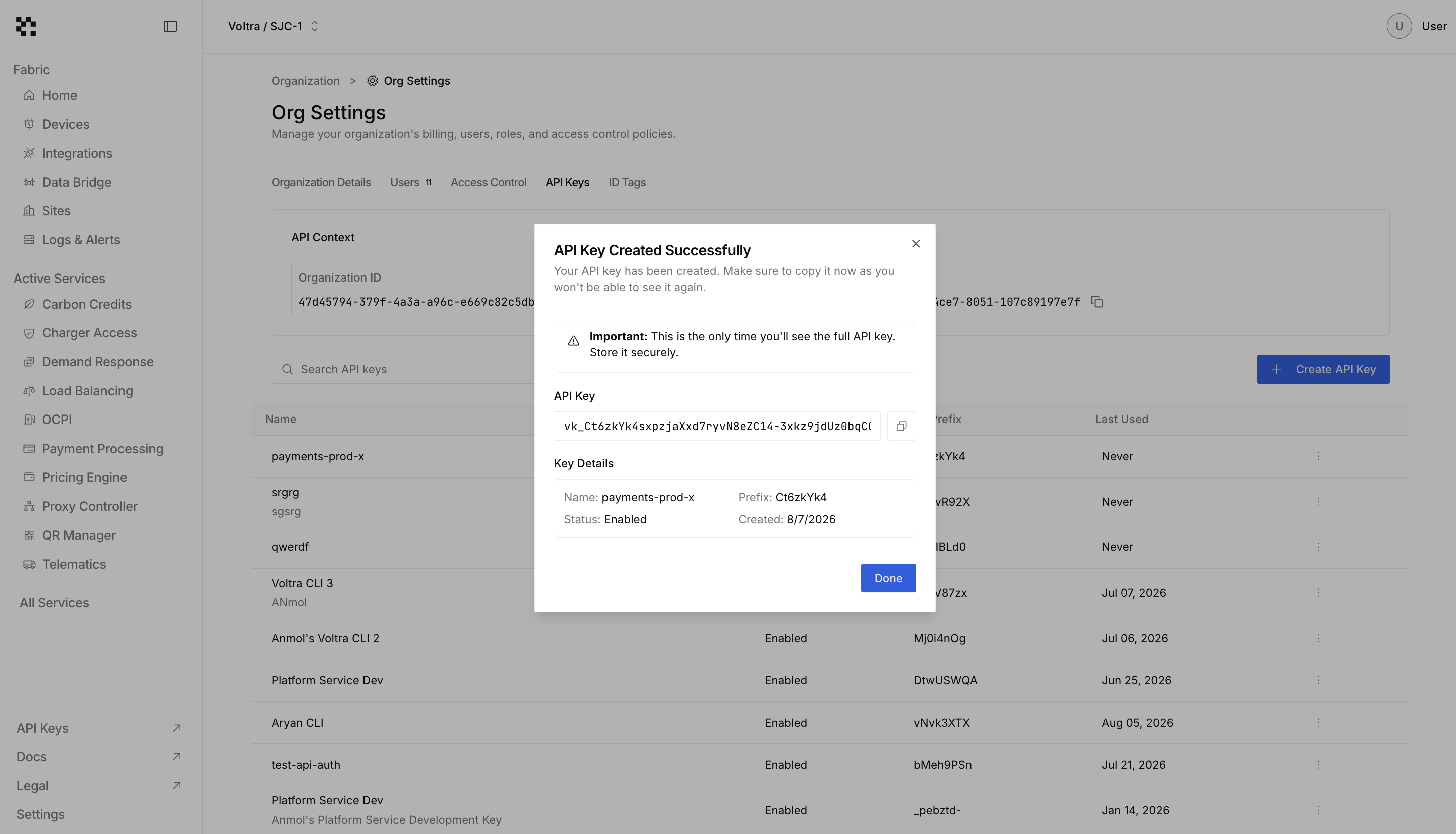
Copy your API key now. You will not be able to see it again after closing the modal.
All API requests use the same authorization header:
```
Authorization: Bearer $VOLTRA_API_KEY
```
## Step 2: List Your Devices
Check what chargers already exist in your organization.
```bash
curl -X GET https://api.voltra.com/csms/v2/chargers/ \
-H "Authorization: Bearer $VOLTRA_API_KEY"
```
```javascript
const response = await fetch("https://api.voltra.com/csms/v2/chargers/", {
headers: { Authorization: `Bearer ${apiKey}` },
})
const data = await response.json()
console.log(data)
```
```python
import requests
response = requests.get(
"https://api.voltra.com/csms/v2/chargers/",
headers={"Authorization": f"Bearer {api_key}"},
)
print(response.json())
```
**Expected response:**
```json
{
"success": true,
"message": "Charge boxes retrieved successfully",
"charge_boxes": [
{
"charge_box_id": "CP001",
"charger_name": "Main Parking Lot Charger",
"status": "Available",
"ocpp_protocol": "ocpp1.6J",
"registration_status": "Accepted"
}
]
}
```
## Step 3: Add a Device
You can add a charger through the Console or the API.
### Using the Console
1. Navigate to **Devices** and click **Add Device**
2. Enter your charger's identifier (the `charge_box_id` printed on the device)
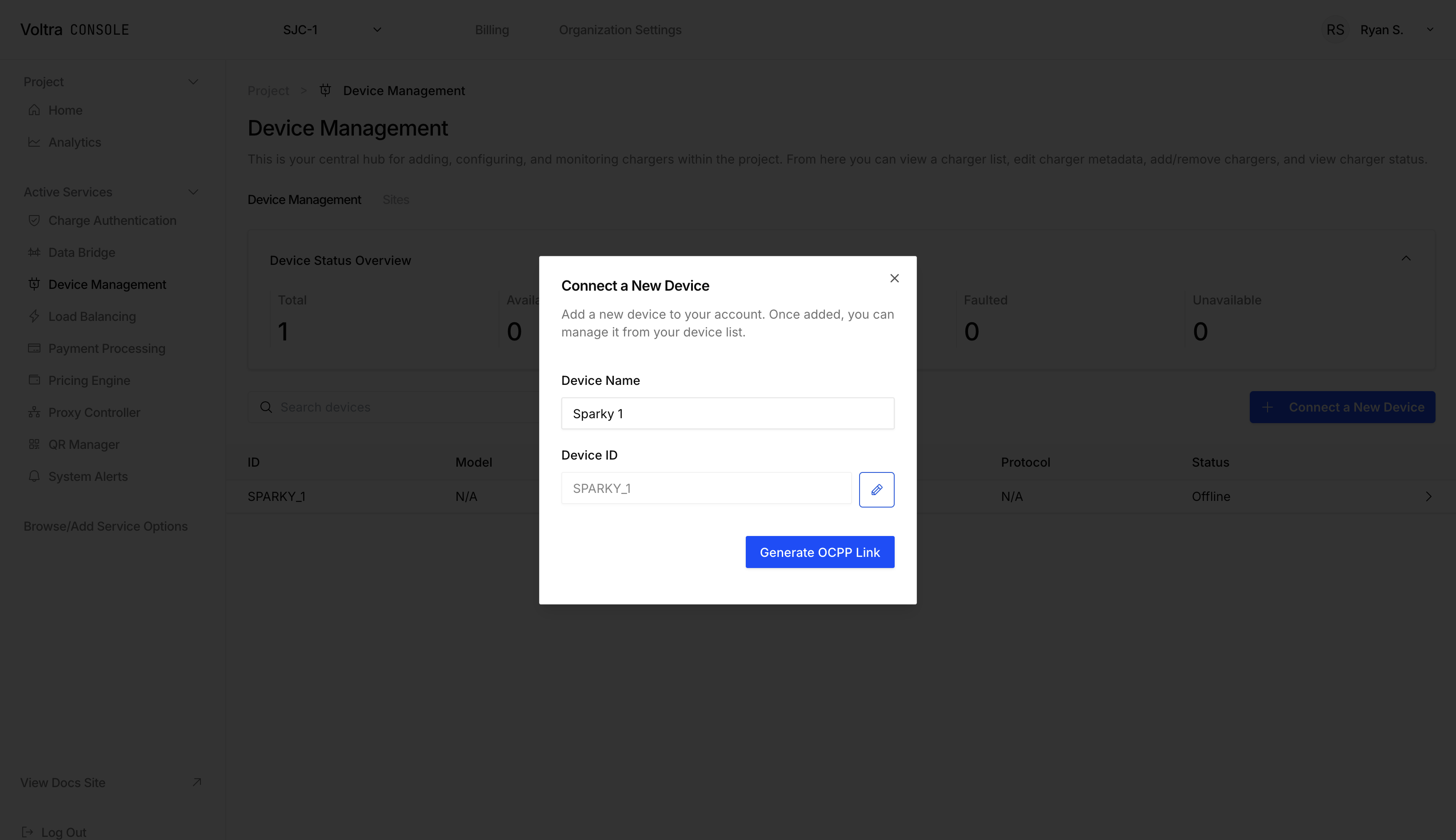
3. Copy the generated OCPP WebSocket URL and password. Configure your charger to connect to this URL.
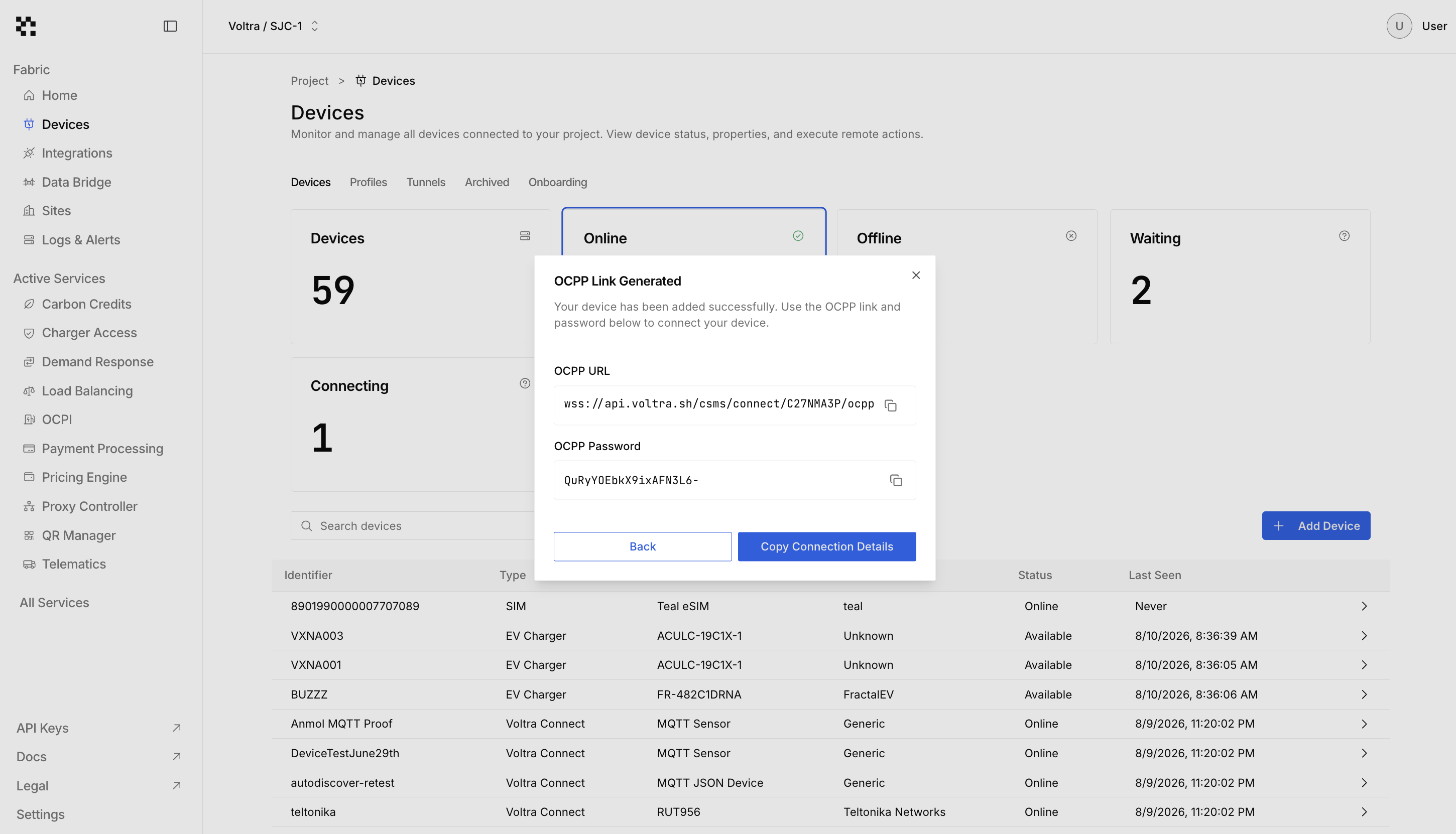
### Using the API
```bash
curl -X POST https://api.voltra.com/csms/v2/chargers/ \
-H "Authorization: Bearer $VOLTRA_API_KEY" \
-H "Content-Type: application/json" \
-d '{
"charge_box_id": "CP001",
"charge_point_vendor": "EVBox",
"charge_point_model": "Elvi"
}'
```
```javascript
const response = await fetch("https://api.voltra.com/csms/v2/chargers/", {
method: "POST",
headers: {
Authorization: `Bearer ${apiKey}`,
"Content-Type": "application/json",
},
body: JSON.stringify({
charge_box_id: "CP001",
charge_point_vendor: "EVBox",
charge_point_model: "Elvi",
}),
})
const data = await response.json()
console.log(data)
```
```python
import requests
response = requests.post(
"https://api.voltra.com/csms/v2/chargers/",
headers={"Authorization": f"Bearer {api_key}"},
json={
"charge_box_id": "CP001",
"charge_point_vendor": "EVBox",
"charge_point_model": "Elvi",
},
)
print(response.json())
```
**Expected response:**
```json
{
"success": true,
"message": "Successfully added charger(s)",
"charger": {
"charge_box_id": "CP001",
"charge_point_vendor": "EVBox",
"charge_point_model": "Elvi",
"registration_status": "Pending",
"organization_id": "123e4567-e89b-12d3-a456-426614174000"
},
"password": "abc123def456"
}
```
The `password` field is the OCPP security credential for the charger. Configure it in your charger's central system settings along with the WebSocket URL.
## Step 4: Monitor Device Status
Once your charger connects, query its status by shortcode.
```bash
curl -X GET https://api.voltra.com/csms/v2/chargers/C7LVNSNL \
-H "Authorization: Bearer $VOLTRA_API_KEY"
```
```javascript
const shortcode = "C7LVNSNL"
const response = await fetch(
`https://api.voltra.com/csms/v2/chargers/${shortcode}`,
{
headers: { Authorization: `Bearer ${apiKey}` },
}
)
const data = await response.json()
console.log(data)
```
```python
import requests
shortcode = "C7LVNSNL"
response = requests.get(
f"https://api.voltra.com/csms/v2/chargers/{shortcode}",
headers={"Authorization": f"Bearer {api_key}"},
)
print(response.json())
```
**Expected response:**
```json
{
"success": true,
"charger": {
"charge_box_id": "CP001",
"charger_name": "Main Parking Lot Charger",
"status": "Available",
"ocpp_protocol": "ocpp1.6J",
"registration_status": "Accepted"
}
}
```
A `status` of `Available` means the charger is online and ready for a charging session.
## What You Built
In this quickstart you:
- Authenticated with the Voltra API using an API key
- Listed all chargers in your organization
- Registered a new charger via Console or API
- Queried a specific charger's real-time status
Your charger is now connected to Voltra's **Connect** layer and reporting its status in real time.
## Next Steps
- [Devices](/docs/Connect/devices) — Learn how device registration, protocols, and status reporting work
- [Organizations](/docs/Platform/organizations) — Set up multi-tenant access for your team
- [API Reference](/api) — Full endpoint documentation for every Voltra API
---
## Platform Overview
URL: https://docs.voltra.com/docs/Platform
# Platform Overview
The Platform layer is the foundation beneath every Voltra capability. It owns the tenancy boundary, identity model, and permission system that all other layers depend on. Whether you are connecting devices, routing data, or executing business logic, the Platform layer determines **who** can act and **where** those actions take effect.
## What the Platform Provides
- **Multi-tenancy** -- every API call is scoped to an organization, ensuring complete data isolation between business entities.
- **Identity** -- users, API keys, and service accounts are first-class objects with auditable lifecycles.
- **Access control** -- role-based policies govern what each identity can read, write, or execute at the organization, project, or resource level.
## Resource Hierarchy
All resources in Voltra live inside a two-level ownership hierarchy:
```
Organization (tenant boundary)
└── Project (resource isolation)
├── Devices
├── Locations
├── Configurations
└── API Keys (project-scoped)
```
**Organizations** represent a business entity -- a charge point operator, fleet manager, or managed-service provider. They are the billing boundary and the outermost security perimeter.
**Projects** subdivide an organization into logical groups. Common patterns include one project per physical site, one per environment (production / staging), or one per end customer in a white-label deployment.
## Key Concepts
| Concept | Purpose |
|-|-|
| [Organizations](/docs/Platform/organizations) | Tenant boundary, billing, and member management |
| [Projects](/docs/Platform/projects) | Resource grouping and service enablement |
| [Access Control](/docs/Platform/access-control) | Roles, policies, and granular permissions |
| [Reference Architecture](/docs/Platform/reference-architecture) | System design and deployment patterns |
| [Security](/docs/Platform/security) | Authentication, encryption, and compliance |
## Next Steps
- [Organizations](/docs/Platform/organizations) -- understand the top-level tenant model
- [Projects](/docs/Platform/projects) -- learn how to isolate resources within an org
- [Access Control](/docs/Platform/access-control) -- configure who can do what
---
## Access Control
URL: https://docs.voltra.com/docs/Platform/access-control
# Access Control
Voltra provides role-based access control (RBAC) to manage who can do what within your organization and projects.
## Core Concepts
### Roles
Roles are named collections of permissions. Common roles include:
| Role | Description |
|-|-|
| Owner | Full access to organization and all projects |
| Accountant | Access to billing, invoices, and financial reports |
| Charge Point Operator | Day-to-day operations (manage chargers, view status, start sessions) |
### Policies
Policies define specific permissions that can be:
- Assigned directly to users
- Grouped into roles
- Scoped to specific resources
### Permissions
Granular actions users can perform:
- `devices:read` - View charger information
- `devices:write` - Modify charger configuration
- `sessions:start` - Initiate charging sessions
- `billing:manage` - Access billing settings
## Permission Scopes
Permissions can be scoped at different levels:
```
Organization Level
└── Applies to all projects
Project Level
└── Applies to specific project only
Resource Level
└── Applies to specific resources (chargers, locations)
```
## Managing Access
### Assigning Roles
1. Go to **Organization Settings** > **Members**
2. Select a user
3. Click **Assign Role**
4. Choose the role and scope
5. Save changes
### Creating Custom Roles
1. Go to **Organization Settings** > **Roles**
2. Click **Create Role**
3. Name the role and add description
4. Select permissions to include
5. Save the role
### Auditing Access
- View all role assignments in **Access Control** settings
- Check user permissions with the validation API
- Review audit logs for permission-related events
## Best Practices
- **Principle of Least Privilege**: Grant minimum necessary permissions
- **Use Roles**: Prefer roles over individual permission assignments
- **Regular Review**: Audit access periodically
- **Document Custom Roles**: Keep records of what custom roles are for
## Managing Access Control via API
```bash
# List permissions for the current user
curl -X GET https://api.voltra.com/csms/v2/access-control/permission \
-H "Authorization: Bearer $VOLTRA_API_KEY"
# Create an access control policy
curl -X POST https://api.voltra.com/csms/v2/access-control/policy \
-H "Authorization: Bearer $VOLTRA_API_KEY" \
-H "Content-Type: application/json" \
-d '{
"name": "Site Operator",
"permissions": ["devices:read", "devices:write", "sessions:start"]
}'
```
```javascript
const headers = { Authorization: `Bearer ${apiKey}` }
// List permissions for the current user
const permissions = await fetch(
"https://api.voltra.com/csms/v2/access-control/permission",
{ headers }
)
// Create an access control policy
const policy = await fetch(
"https://api.voltra.com/csms/v2/access-control/policy",
{
method: "POST",
headers: { ...headers, "Content-Type": "application/json" },
body: JSON.stringify({
name: "Site Operator",
permissions: ["devices:read", "devices:write", "sessions:start"],
}),
}
)
```
```python
import requests
headers = {"Authorization": f"Bearer {api_key}"}
# List permissions for the current user
permissions = requests.get(
"https://api.voltra.com/csms/v2/access-control/permission",
headers=headers,
)
# Create an access control policy
policy = requests.post(
"https://api.voltra.com/csms/v2/access-control/policy",
headers=headers,
json={
"name": "Site Operator",
"permissions": ["devices:read", "devices:write", "sessions:start"],
},
)
```
> **See also:** [Access Control API Reference](/docs/api-reference/access-control) for the full endpoint documentation.
## Next Steps
- [Organizations](/docs/Platform/organizations) -- organization-level access boundaries
- [Projects](/docs/Platform/projects) -- project-level access scoping
- [Security](/docs/Platform/security) -- authentication, encryption, and compliance
---
## Organizations
URL: https://docs.voltra.com/docs/Platform/organizations
# Organizations
Organizations are the top-level container in Voltra's multi-tenant architecture. They represent a business entity such as a charge point operator, fleet manager, or property owner.
## Organization Structure
```
Organization
├── Organization Details (address, contact info)
├── Members (users with access)
├── Projects
│ ├── Project A (Production)
│ │ ├── Services
│ │ └── Resources (chargers, locations, etc.)
│ └── Project B (Staging)
│ ├── Services
│ └── Resources
└── Billing & Subscription
```
## Key Concepts
### Multi-tenancy
Each organization is fully isolated:
- Separate data storage
- Independent configuration
- Dedicated API credentials
- Isolated user access
### Organization Details
Organizations can store:
- Legal business name
- Billing and mailing addresses
- Contact information
- Tax identifiers
### Member Management
Control who has access to your organization:
- Invite users by email
- Assign roles and permissions
- Remove access when needed
- Track member activity
## Common Patterns
### Single Organization
Most operators use a single organization with multiple projects:
- One project per site or region
- Shared team access across projects
- Centralized billing
### Multiple Organizations
Managed service providers may use multiple organizations:
- One organization per end customer
- Separate billing per organization
- White-label deployments
## Managing Organizations via API
```bash
# List all organizations
curl -X GET https://api.voltra.com/csms/v2/organization/ \
-H "Authorization: Bearer $VOLTRA_API_KEY"
# Create an organization
curl -X POST https://api.voltra.com/csms/v2/organization/ \
-H "Authorization: Bearer $VOLTRA_API_KEY" \
-H "Content-Type: application/json" \
-d '{
"name": "ACME Charging",
"country": "US"
}'
```
```javascript
const headers = { Authorization: `Bearer ${apiKey}` }
// List all organizations
const orgs = await fetch("https://api.voltra.com/csms/v2/organization/", {
headers,
})
// Create an organization
const newOrg = await fetch("https://api.voltra.com/csms/v2/organization/", {
method: "POST",
headers: { ...headers, "Content-Type": "application/json" },
body: JSON.stringify({
name: "ACME Charging",
country: "US",
}),
})
```
```python
import requests
headers = {"Authorization": f"Bearer {api_key}"}
# List all organizations
orgs = requests.get(
"https://api.voltra.com/csms/v2/organization/",
headers=headers,
)
# Create an organization
new_org = requests.post(
"https://api.voltra.com/csms/v2/organization/",
headers=headers,
json={
"name": "ACME Charging",
"country": "US",
},
)
```
> **See also:** [Organizations API Reference](/docs/api-reference/organizations) for the full endpoint documentation.
## Next Steps
- [Projects](/docs/Platform/projects) -- organize resources within an organization
- [Access Control](/docs/Platform/access-control) -- manage member permissions
- [Security](/docs/Platform/security) -- authentication and encryption
---
## Projects
URL: https://docs.voltra.com/docs/Platform/projects
# Projects
Projects are containers within an organization that group related resources and services. They provide logical separation for different sites, environments, or use cases.
## What Projects Contain
- **Devices**: Chargers registered to the project
- **Locations**: Physical sites with chargers
- **Services**: Enabled capabilities (pricing, payments, etc.)
- **Configuration**: Project-specific settings
## Common Project Structures
### By Location
```
Organization: ACME Charging
├── Project: Downtown Garage
├── Project: Airport Terminal A
└── Project: Corporate Campus
```
### By Environment
```
Organization: ACME Charging
├── Project: Production
├── Project: Staging
└── Project: Development
```
### By Customer (for MSPs)
```
Organization: Managed Services Co
├── Project: Customer A - Sites
├── Project: Customer B - Sites
└── Project: Customer C - Sites
```
## Services
Each project can enable different services based on needs:
| Service | Description |
|-|-|
| Device Management | Core charger connectivity |
| Locations | Site and location management |
| Charge Authorization | Driver and RFID management |
| Payment Processing | Payment collection |
| Pricing Engine | Rate configuration |
| Load Management | Site power balancing |
| Data Bridge | External integrations |
### Enabling Services
1. Navigate to **Project Settings** > **Services**
2. Click **Enable** on the desired service
3. Accept any terms of service if required
4. Configure service-specific settings
## Project Settings
- **Name and Description**: Identify the project
- **Default Configuration**: Default settings for new resources
- **Webhooks**: Project-level event notifications
- **API Keys**: Project-scoped credentials
## Managing Projects via API
```bash
# List all projects
curl -X GET https://api.voltra.com/csms/v2/projects/ \
-H "Authorization: Bearer $VOLTRA_API_KEY"
# Create a project
curl -X POST https://api.voltra.com/csms/v2/projects/ \
-H "Authorization: Bearer $VOLTRA_API_KEY" \
-H "Content-Type: application/json" \
-d '{
"name": "Downtown Garage",
"description": "Production site for downtown parking structure"
}'
```
```javascript
const headers = { Authorization: `Bearer ${apiKey}` }
// List all projects
const projects = await fetch("https://api.voltra.com/csms/v2/projects/", {
headers,
})
// Create a project
const newProject = await fetch("https://api.voltra.com/csms/v2/projects/", {
method: "POST",
headers: { ...headers, "Content-Type": "application/json" },
body: JSON.stringify({
name: "Downtown Garage",
description: "Production site for downtown parking structure",
}),
})
```
```python
import requests
headers = {"Authorization": f"Bearer {api_key}"}
# List all projects
projects = requests.get(
"https://api.voltra.com/csms/v2/projects/",
headers=headers,
)
# Create a project
new_project = requests.post(
"https://api.voltra.com/csms/v2/projects/",
headers=headers,
json={
"name": "Downtown Garage",
"description": "Production site for downtown parking structure",
},
)
```
> **See also:** [Projects API Reference](/docs/api-reference/projects) for the full endpoint documentation.
## Next Steps
- [Organizations](/docs/Platform/organizations) -- parent container for projects
- [Access Control](/docs/Platform/access-control) -- control who can access project resources
- [Security](/docs/Platform/security) -- authentication and encryption
---
## Reference Architecture
URL: https://docs.voltra.com/docs/Platform/reference-architecture
# Reference Architecture
The Voltra platform is built on a layered architecture designed for scalability, reliability, and flexibility. This page explains how the platform is structured and how data flows through the system.
## Architecture Overview
Voltra consists of three interconnected layers, each with distinct responsibilities:
```mermaid
flowchart TB
subgraph CMD["COMMAND — Business Logic"]
direction LR
C1["Pricing"]
C2["Payments"]
C3["Authorization"]
C4["Load Management"]
end
subgraph CDT["CONDUIT — Data Routing"]
direction LR
B1["Event Router"]
B2["Data Bridge"]
B3["Webhooks"]
end
subgraph CNT["CONNECT — Device Communication"]
direction LR
A1["Device Gateway"]
A2["Protocol Handlers"]
A3["Device Registry"]
end
EXT["Your Applications & Integrations"] <--> CMD
CMD <--> CDT
CDT <--> CNT
CDT <-.->|"Data Streaming"| EXT
CNT <--> DEV["EV Chargers & Devices"]
```
## The Three Layers
### Connect
Connect is the foundation of the platform. It maintains persistent connections with your charging devices, translates protocols (OCPP 1.6 and 2.0.1), and manages device identity and configuration. All device communication flows through Connect, which handles reliability concerns like reconnection and message queuing automatically.
### Conduit
Conduit sits in the middle, routing data where it needs to go. It distributes events between platform components, streams data to external systems via configurable connectors, and delivers webhooks for event-driven integrations. Use Conduit's Data Bridge to push charging data to your analytics platforms or custom applications.
### Command
Command is where business logic lives. It provides the services that power your charging operations: authorizing drivers, processing payments, calculating prices, and balancing load across chargers. Command services are organized into product families—Volta Charge for charging operations and Volta Grid for energy optimization.
## Multi-Tenancy
Your data is isolated at every layer. Organizations have completely separate data storage, API credentials are scoped to organizations and projects, and resources belong to exactly one project. See [Organizations](./organizations) and [Projects](./projects) for details.
## Next Steps
- [Connect](./connect) — Device connectivity details
- [Conduit](./conduit) — Data routing and integrations
- [Command](./command) — Business logic services
---
## Security
URL: https://docs.voltra.com/docs/Platform/security
# Security
Voltra is built with security as a core principle. This page outlines our security practices and compliance certifications.
## Authentication
### API Authentication
- **API Keys**: Project-scoped credentials for programmatic access
- **Bearer Tokens**: JWT-based authentication for user sessions
- **OAuth 2.0**: Third-party application authorization
### Device Authentication
- **OCPP Basic Auth**: Username/password for charger connections
- **Certificate-based**: TLS client certificates for enhanced security
- **Credential Rotation**: Automated and manual credential refresh
## Authorization
### Role-Based Access Control
- Granular permissions system
- Custom role creation
- Resource-level access control
- See [Access Control](./access-control) for details
### API Scopes
- Fine-grained API permissions
- Least-privilege key creation
- Scope validation on every request
## Data Protection
### Encryption in Transit
- TLS 1.2+ for all connections
- OCPP over Secure WebSocket (wss://)
- Certificate validation enforced
### Encryption at Rest
- AES-256 encryption for stored data
- Encrypted database storage
- Secure key management
### Data Isolation
- Tenant data isolation
- Logical separation between organizations
- No cross-tenant data access
## Compliance
### Certifications
| Certification | Status |
|--------------|--------|
| SOC 2 Type II | Certified |
| GDPR | Compliant |
| PCI DSS | Compliant (for payment processing) |
### Data Residency
- Data processing region selection
- EU data residency options
- Data export capabilities
## Security Practices
- Regular security audits
- Penetration testing
- Vulnerability scanning
- Incident response procedures
- Security awareness training
## Reporting Security Issues
Report security vulnerabilities to [security@voltra.com](mailto:security@voltra.com).
## Learn More
- [Access Control](./access-control) - Permission management
- [API Keys](../Developer/api-keys) - Credential management
- [Legal](../Developer/legal) - Compliance documentation
---
## Products Overview
URL: https://docs.voltra.com/docs/Products
# Products Overview
Voltra's platform capabilities are packaged into products designed for specific use cases. Each product combines multiple services to deliver complete solutions.
## Our Products
| Product | Description |
|---------|-------------|
| [Charge](./charge) | Complete EV charging station management |
| [Otto](./otto) | Driver-facing mobile experience |
| [Grid](./grid) | Energy and load optimization |
| [EMS](./ems) | Enterprise Energy Management System |
| [Vantage](./vantage) | AI-powered operations platform |
## How Products and Services Relate
Products are built on top of platform services:
```
┌─────────────────────────────────────────────────┐
│ PRODUCTS │
│ ┌─────────┐ ┌─────────┐ ┌─────────┐ ┌────────┐│
│ │ Charge │ │ Otto │ │ Grid │ │ EMS ││
│ └─────────┘ └─────────┘ └─────────┘ └────────┘│
├─────────────────────────────────────────────────┤
│ SERVICES │
│ Device Mgmt │ Pricing │ Payments │ Load Mgmt │
│ Auth │ Locations │ Data Bridge │ QR Manager │
├─────────────────────────────────────────────────┤
│ PLATFORM │
│ Connect │ Conduit │ Command │
└─────────────────────────────────────────────────┘
```
## Choosing a Product
- **Charge Point Operators**: Start with Charge for station management
- **Fleet Managers**: Combine Charge with Grid for depot charging
- **Energy Providers**: Use Grid and EMS for energy optimization
- **Developers**: Use individual services via API for custom solutions
---
## Charge
URL: https://docs.voltra.com/docs/Products/charge
# Charge
Volta Charge is Voltra's complete EV charging station management product. It provides everything you need to deploy, operate, and monetize a charging network.
## Key Features
### Station Management
- Connect chargers from any OCPP-compatible vendor
- Real-time monitoring and status updates
- Remote operations (start/stop, reset, unlock)
- Firmware management and diagnostics
### Driver Experience
- Mobile app and RFID authorization
- Reservation system
- Session history and receipts
- Multiple payment options
### Pricing & Payments
- Flexible pricing models (per-kWh, per-minute, flat rate)
- Time-of-use pricing
- Payment processing integration
- Invoicing and billing
### Operations
- Dashboard for network overview
- Alerts and notifications
- Maintenance scheduling
- Usage analytics and reporting
## Powered By
Charge combines these platform services:
- [Device Management](../Services/DeviceManagement/)
- [Locations](../Services/Locations/)
- [Charge Authorization](../Services/ChargeAuthorization/)
- [Payment Processing](../Services/PaymentProcessing/)
- [Pricing Engine](../Services/PricingEngine/)
- [QR Code Manager](../Services/QRCodeManager/)
## Who Uses Charge
- Charge Point Operators (CPOs)
- Property owners with EV charging
- Workplace charging programs
- Retail and hospitality venues
- Fleet operators
## Getting Started
1. [Set up your account](../Overview/account-setup)
2. [Add your first charger](../Overview/quickstart)
3. Configure [pricing policies](../Services/PricingEngine/)
4. Enable [payment processing](../Services/PaymentProcessing/)
---
## EMS
URL: https://docs.voltra.com/docs/Products/ems
# EMS
The Voltra Energy Management System (EMS) provides enterprise-level energy optimization across your entire facility, integrating EV charging with building loads, solar, storage, and grid connections.
## Key Features
### Holistic Energy Management
- Unified view of all energy assets
- EV charging integrated with building systems
- Solar and storage coordination
- Grid interconnection management
### Optimization Engine
- Cost minimization algorithms
- Peak demand reduction
- Renewable energy maximization
- Carbon footprint optimization
### Utility Integration
- Rate schedule management
- Demand response automation
- Grid signal processing
- Utility API connections
### Enterprise Controls
- Multi-site management
- Centralized policy configuration
- Role-based access across facilities
- Enterprise-wide reporting
## Architecture
```
┌─────────────────────────────────────────────────┐
│ EMS │
│ ┌─────────┐ ┌─────────┐ ┌─────────┐ │
│ │Optimizer│ │ Monitor │ │ Control │ │
│ └─────────┘ └─────────┘ └─────────┘ │
├─────────────────────────────────────────────────┤
│ Connected Assets │
│ EV Chargers │ Solar │ Battery │ Building │ Grid│
└─────────────────────────────────────────────────┘
```
## Use Cases
- Large commercial properties
- Industrial facilities
- University campuses
- Hospital systems
- Corporate headquarters
## Private Preview
EMS is currently in private preview. Contact [sales@voltra.com](mailto:sales@voltra.com) to learn more about early access.
---
## Grid
URL: https://docs.voltra.com/docs/Products/grid
# Grid
Volta Grid is Voltra's energy and load optimization product. It helps you manage power consumption across your charging infrastructure while maintaining driver satisfaction.
## Key Features
### Load Management
- Site-level power limits
- Dynamic load balancing across chargers
- Priority-based charging allocation
- Real-time power monitoring
### Smart Charging
- Time-of-use optimization
- Grid signal response
- Demand charge management
- Off-peak charging incentives
### VPP Participation
- Virtual Power Plant integration
- Demand response programs
- Grid services revenue
- Automated dispatch
### Energy Analytics
- Consumption dashboards
- Peak demand tracking
- Cost optimization reports
- Carbon impact metrics
## Powered By
Grid combines these platform services:
- [Load Management](../Services/LoadManagement/)
- [Device Management](../Services/DeviceManagement/)
## Use Cases
### Fleet Depot Charging
- Charge entire fleet within power limits
- Optimize for departure schedules
- Minimize demand charges
- Track energy costs per vehicle
### Commercial Sites
- Share power with building loads
- Avoid infrastructure upgrades
- Participate in utility programs
- Reduce operating costs
### Grid Services
- Provide grid balancing services
- Earn demand response revenue
- Support renewable integration
- Meet sustainability goals
## Getting Started
1. [Add your chargers](../Overview/quickstart)
2. Configure [sites and load groups](../Services/LoadManagement/)
3. Set power limits and priorities
4. Monitor and optimize
## Learn More
- [Load Management Service](../Services/LoadManagement/)
- [Load Management API](/api/Command/VoltaGrid/LoadManagement)
---
## Otto
URL: https://docs.voltra.com/docs/Products/otto
# Otto
Otto is Voltra's driver-facing mobile experience. It provides EV drivers with a seamless way to find, use, and pay for charging.
## Key Features
### Find Charging
- Map-based charger discovery
- Real-time availability status
- Charger details and amenities
- Navigation integration
### Start Charging
- QR code scanning
- Mobile app authorization
- RFID card support
- Plug and charge
### Pay for Charging
- Stored payment methods
- Pay-per-use options
- Session receipts
- Charging history
### Manage Account
- Profile management
- Payment method management
- Notification preferences
- Support access
## Integration with Charge
Otto integrates seamlessly with Volta Charge:
- Operators configure stations in Charge
- Drivers access stations through Otto
- Payments flow through Payment Processing
- Authorization via Charge Authorization
## White-Label Options
Otto can be white-labeled for:
- Custom branding
- Operator-specific apps
- Fleet driver portals
- Enterprise deployments
## For Developers
Build custom driver experiences using our APIs:
- [Device Management API](/api/DeviceConnectivity/DeviceManagement) - Station information
- [Charging Sessions API](/api/Command/VoltaCharge/ChargingSessions) - Session data
- [Payment Processing API](/api/Command/VoltaCharge/PaymentProcessing) - Payment handling
## Learn More
Contact [sales@voltra.com](mailto:sales@voltra.com) for Otto availability and white-label options.
---
## Vantage
URL: https://docs.voltra.com/docs/Products/vantage
# Vantage
Vantage is Voltra's AI-powered operations platform. It brings generative AI capabilities to your charging infrastructure, helping you work smarter and faster.
## Key Features
### Generative UI
- AI-generated dashboards and reports
- Natural language queries
- Custom visualizations on demand
- Automated insights
### Logging Analysis
- AI-powered log parsing
- Anomaly detection
- Root cause analysis
- Predictive maintenance alerts
### Code Generation
- Integration code assistance
- API usage examples
- Configuration generation
- Troubleshooting scripts
## How Vantage Works
Vantage runs across the entire Voltra stack, providing AI assistance for:
- **Operations**: "Show me chargers with connection issues this week"
- **Analysis**: "Why did sessions drop at Site A yesterday?"
- **Development**: "Generate Python code to fetch all offline chargers"
- **Reporting**: "Create a monthly utilization report for stakeholders"
## Integration
Vantage integrates with all Voltra services:
- Device Management data
- Charging session analytics
- Load management metrics
- Payment and revenue data
## Private Preview
Vantage is currently in private preview as we continue to refine and expand its capabilities.
If you're interested in early access or would like to learn more about how Vantage can enhance your operations, please reach out to [developer@voltra.com](mailto:developer@voltra.com).
## Learn More
- [Vantage API Reference](/api/Vantage) - API documentation (coming soon)
---
## Services Overview
URL: https://docs.voltra.com/docs/Services
# Services Overview
Services are the modular building blocks of the Voltra platform. Each service provides specific functionality that can be enabled per-project.
## Available Services
### Connect Layer
| Service | Description |
|---------|-------------|
| [Device Management](./DeviceManagement/index) | Register, monitor, and control chargers |
| [Locations](./Locations/index) | Manage physical sites and locations |
### Conduit Layer
| Service | Description |
|---------|-------------|
| [Data Bridge](./DataBridge/index) | Stream data to external systems |
### Command Layer
| Service | Description |
|---------|-------------|
| [Charge Authorization](./ChargeAuthorization/index) | Manage drivers and credentials |
| [Payment Processing](./PaymentProcessing/index) | Accept and process payments |
| [Pricing Engine](./PricingEngine/index) | Configure charging rates |
| [Load Management](./LoadManagement/index) | Balance power across chargers |
| [QR Code Manager](./QRCodeManager/index) | Generate and manage QR codes |
| [Proxy](./Proxy/index) | Route OCPP messages |
## Enabling Services
Services are enabled at the project level:
1. Navigate to your project
2. Go to **Settings** > **Services**
3. Click **Enable** on the desired service
4. Accept terms if prompted
5. Configure service settings
## Service Dependencies
Some services require others:
- Payment Processing requires Pricing Engine
- Load Management requires Device Management
- Charge Authorization requires Device Management
Voltra automatically enables required dependencies.
## API Access
Each service has its own API. See the [API Reference](/api) for complete documentation.
---
## About
URL: https://docs.voltra.com/docs/Services/ChargeAuthorization
# About
Charger authentication gives you fine grained control over authorization methods for EV charging.
## Use Cases
- **Fleets**: Vehicles can be granted charge authorization based on their vehicle ID (where compatible)
- **Residential Complexes**: Residents can be granted free charging with their occupancy agreements.
- **Commercial Offices**: Give your employees free charging. Offer your chargers up to visitors for paid charging after hours.
## Authorization Types
- **Pin Code**: Offer unique pin codes for specific users to grant specific authorization.
- **RFID**: Use RFID cards to authenticate users and authorize their charger.
- **Guest Authorization**: Give visitors the option to charge their EV without an organization account.
## Try it Out
Get started by [Creating an Authorization Policy](./creating-an-authorization-policy).
---
## Creating an Authorization Policy
URL: https://docs.voltra.com/docs/Services/ChargeAuthorization/creating-an-authorization-policy
# Creating an Authorization Policy
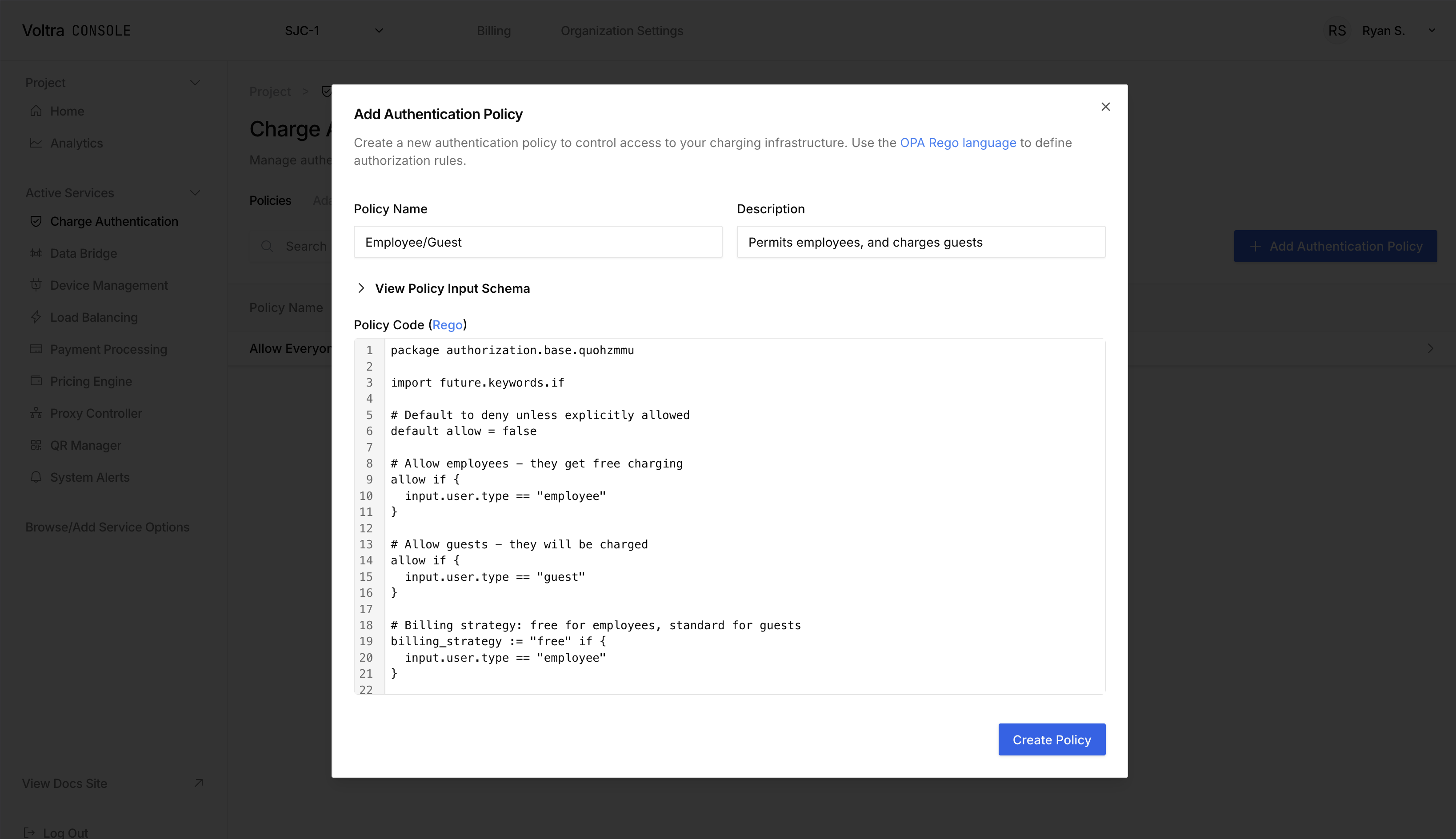
Start by visiting the [Charge Authentication Page](https://console.voltra.com/dashboard/charge-authentication).
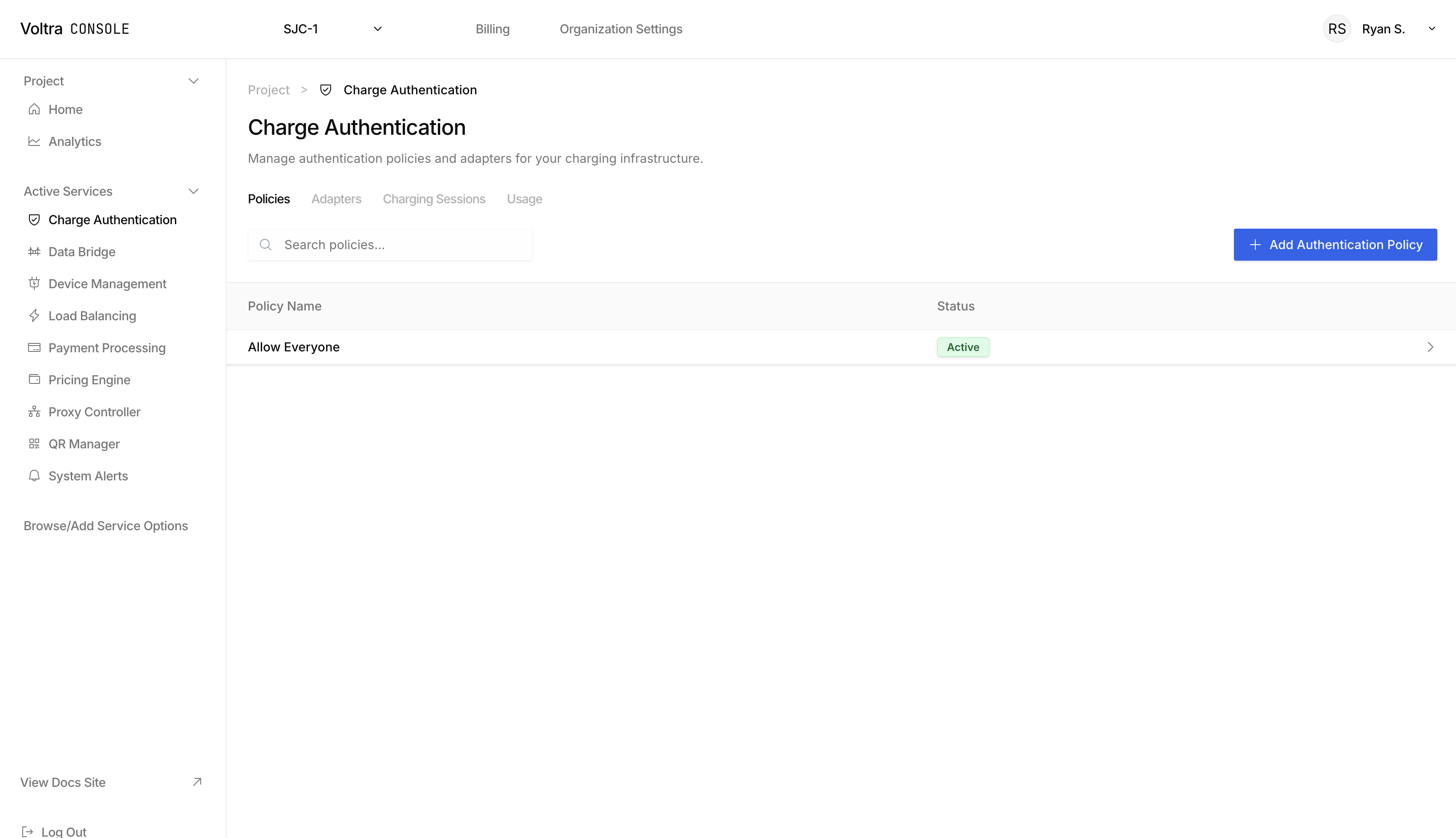
Click on the "+ Add Authentication Policy" to open the "Add Authentication Policy" modal. Here is where you can fill out any complex pricing policies.
## Pricing Policy Examples
### Employee / Guest Pricing Policies
```hcl
import future.keywords.if
# Default to deny unless explicitly allowed
default allow = false
# Allow employees - they get free charging
allow if {
input.user.type == "employee"
}
# Allow guests - they will be charged
allow if {
input.user.type == "guest"
}
# Billing strategy: free for employees, driver pays for guests
billing_strategy := "bypass" if {
input.user.type == "employee"
}
override_per_unit_price := 0 if {
input.user.type == "employee"
}
billing_strategy := "driver_pays" if {
input.user.type == "guest"
}
# Contextual metadata about the decision
context := {
"policy": "employee_guest",
"user_type": input.user.type,
"payment_method": input.user.payment_method,
"timestamp": input.timestamp
}
# Denial reason for registered customers or other user types
denial_reason := "Access denied: Only employees and guests are permitted" if {
not allow
}
```
### Enforce Preauthorization Limits for Different Users
```hcl
package authorization.spending_limits
import future.keywords.if
default allow = false
# Guests have a lower pre-auth limit ($50)
allow if {
input.user.type == "guest"
input.pre_auth_amount <= 5000 # Assuming cents
}
# Registered customers have medium limit ($200)
allow if {
input.user.type == "registered_customer"
input.pre_auth_amount <= 20000
}
# Employees have no limit
allow if {
input.user.type == "employee"
}
billing_strategy := "driver_pays" if {
allow
input.user.type == "guest"
}
billing_strategy := "driver_pays" if {
allow
input.user.type == "registered_customer"
}
billing_strategy := "bypass" if {
allow
input.user.type == "employee"
}
override_per_unit_price := 0 if {
allow
input.user.type == "employee"
}
denial_reason := sprintf("Pre-authorization amount $%.2f exceeds limit for %s users",
[input.pre_auth_amount / 100, input.user.type]) if {
not allow
}
```
### Charger Specific VIP Access
```hcl
package authorization.vip_chargers
import future.keywords.if
default allow = false
vip_chargers := {
"charger-vip-001",
"charger-vip-002",
"charger-executive-parking"
}
is_vip_charger if {
vip_chargers[input.charger.charge_box_id]
}
# Only employees can use VIP chargers
allow if {
is_vip_charger
input.user.type == "employee"
}
# Everyone can use regular chargers
allow if {
not is_vip_charger
}
billing_strategy := "bypass" if {
allow
is_vip_charger
input.user.type == "employee"
}
override_per_unit_price := 0 if {
allow
is_vip_charger
input.user.type == "employee"
}
billing_strategy := "driver_pays" if {
allow
not is_vip_charger
}
context := {
"policy": "vip_chargers",
"is_vip_charger": is_vip_charger,
"charger_id": input.charger.charge_box_id
}
denial_reason := "Access denied: VIP chargers are reserved for employees only" if {
not allow
is_vip_charger
}
```
## Need Support?
Let us help you. Send enquiries to [hello@voltra.com](emailto:hello@voltra.com)
---
## About
URL: https://docs.voltra.com/docs/Services/DataBridge
# About
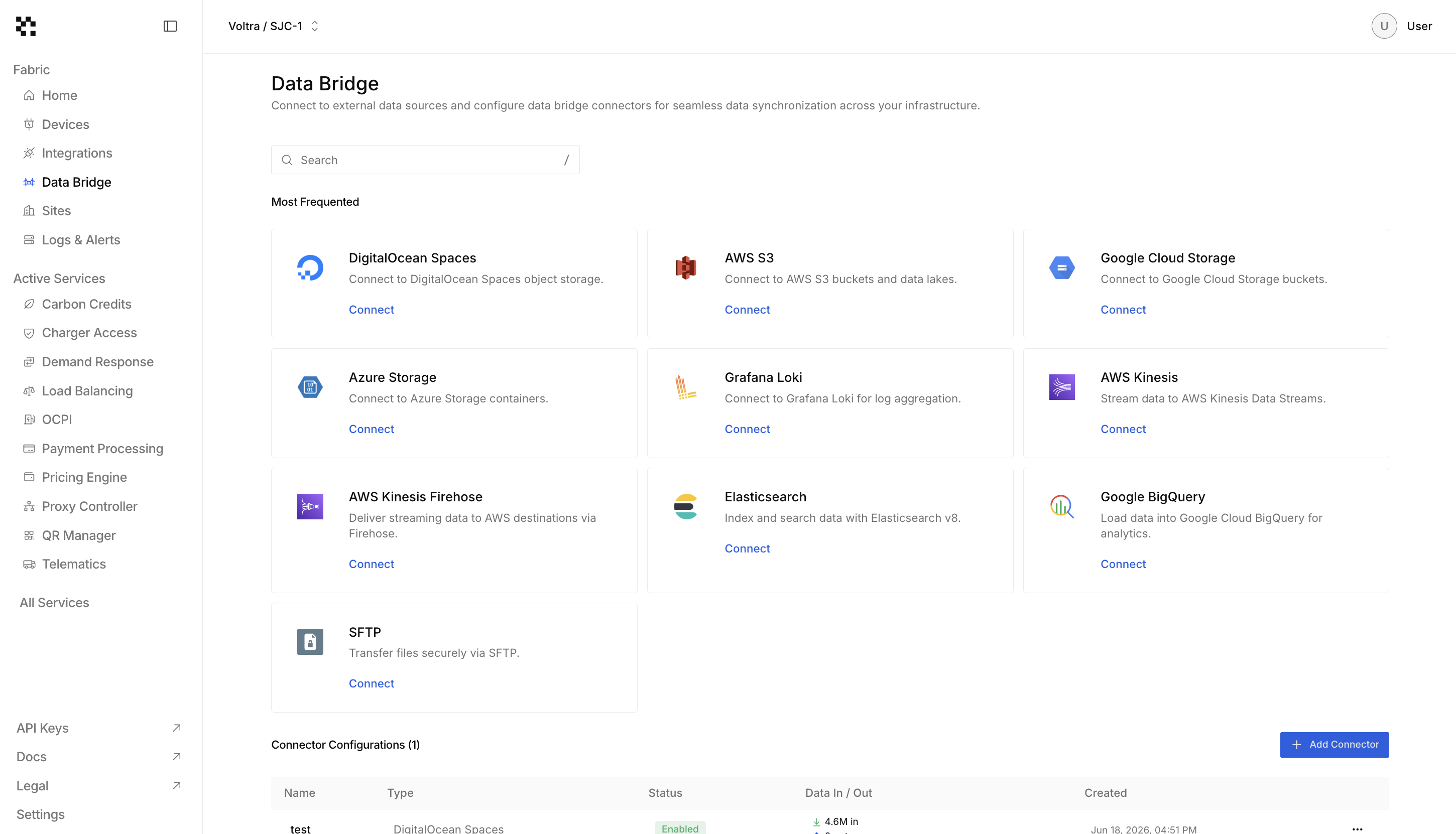
Data Bridge connects your charger data to external data sources so you can seamlessly operate on, analyze and export your charger data.
## Connection Compatibility
We offer data connectors for:
- **DigitalOcean Spaces**
- **AWS S3**
- **Google Cloud Storage**
- **Azure Storage**
## Custom Connections
Need to export your data into a different data source? Email [hello@voltra.com](emailto:hello@voltra.com) and we'll be happy to add a new data connection.
## Ready to try it out?
Try [Creating a Connector](./creating-a-connector)
---
## Creating a Connector
URL: https://docs.voltra.com/docs/Services/DataBridge/creating-a-connector
# Creating a Connector
## Data Bridge Page
Start by visiting the [Data Bridge page](https://console.voltra.com/dashboard/data-bridge).

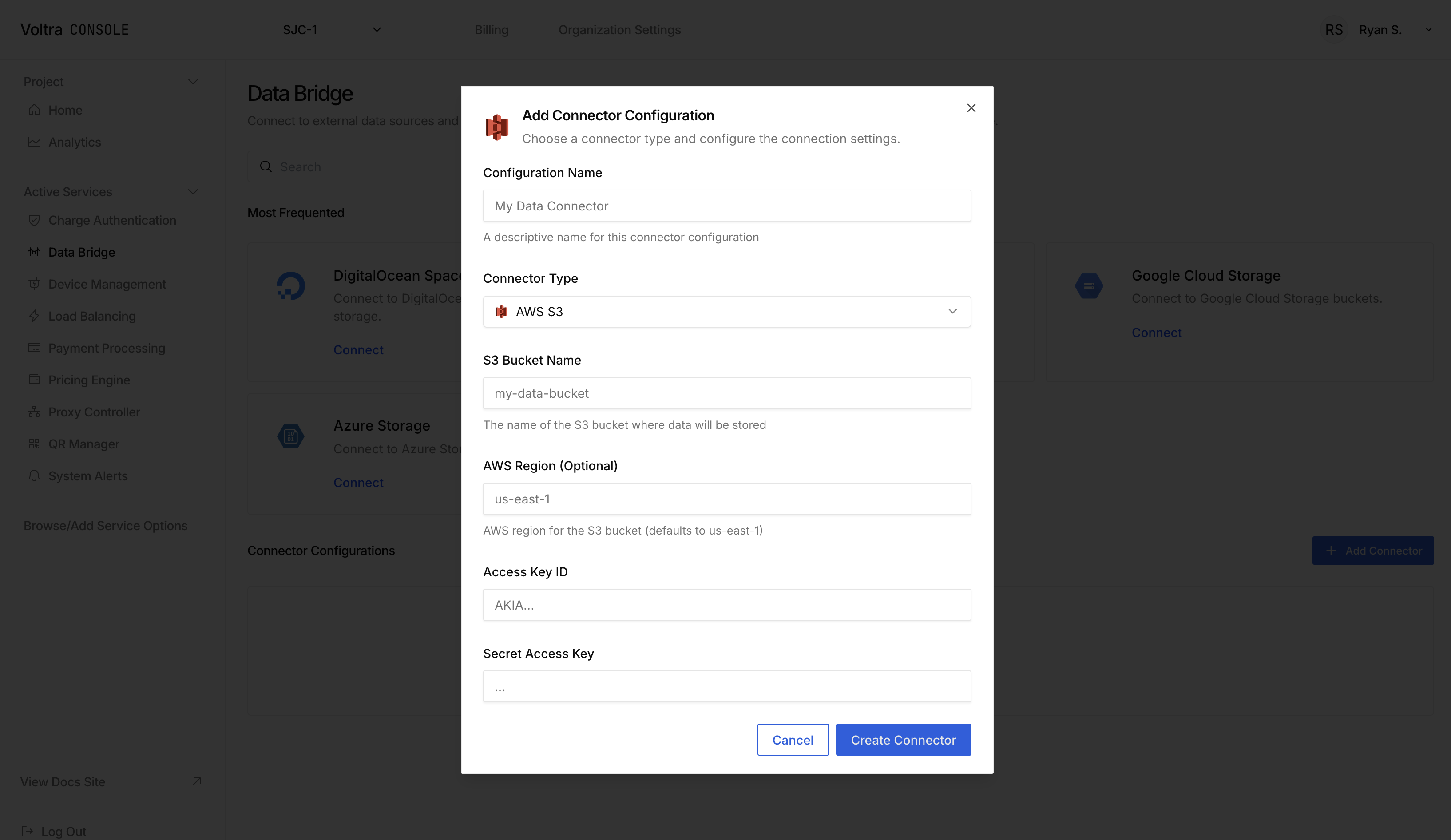
## Adding a Connector
Click on "+ Add Connector" to open up the add connector modal. Alternatively click on the "Connect" button in the data bridge card that you want to connect to. Fill in the configuration for your connector and hit "Create Connector" to start streaming your logs into the data source.
## Need Support?
Contact [hello@voltra.com](emailto:hello@voltra.com) to get help.
---
## About
URL: https://docs.voltra.com/docs/Services/DeviceManagement
# About
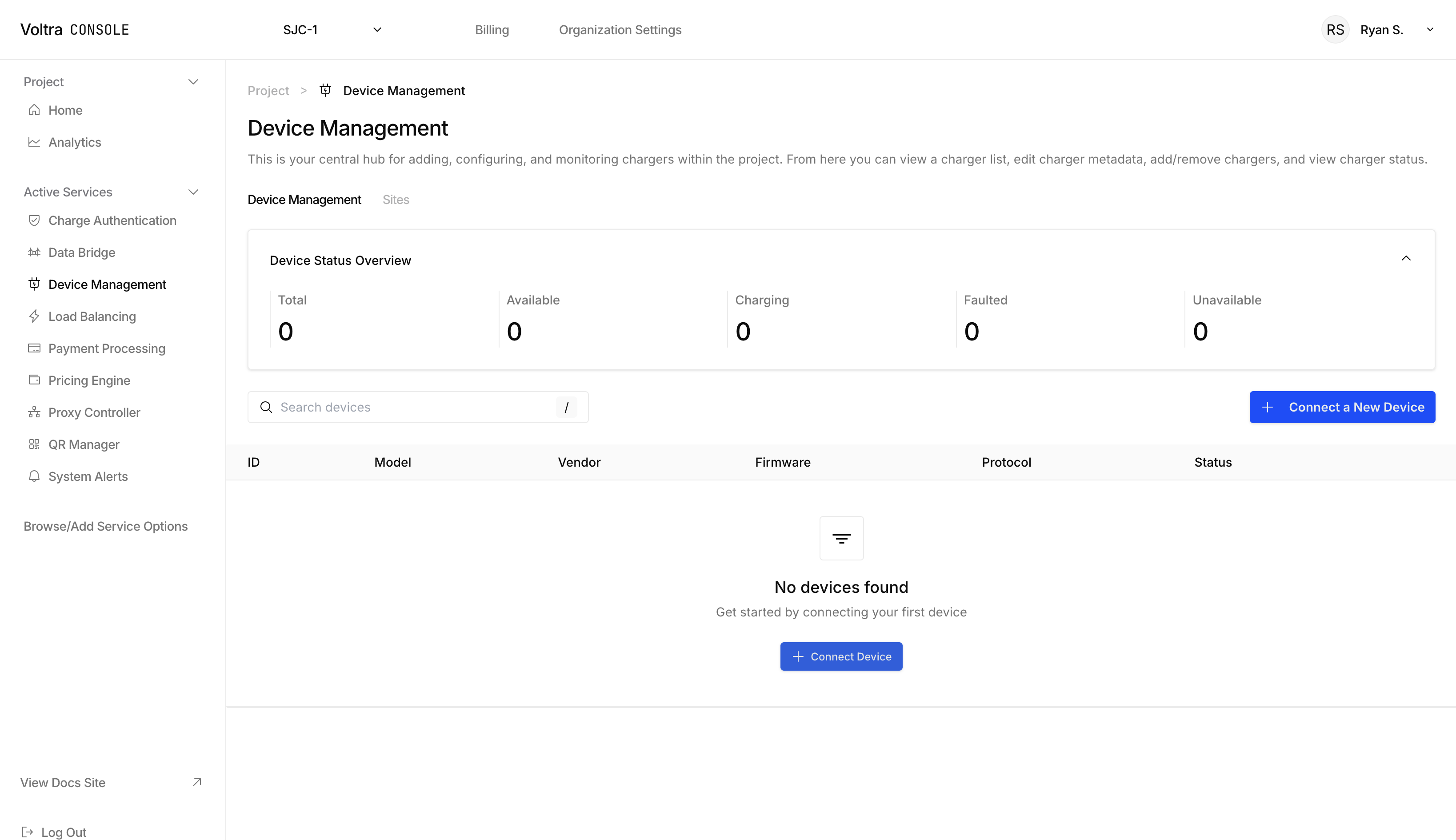
Voltra's Device Management platform provides charging tools, monitoring, and maintenance capabilities for EV Chargers. Device Management enables operators to remotely manage their entire charging network, from individual chargers to large-scale deployments, ensuring optimal performance, reliability, and uptime.
## Key Features
### Charger Management
Create, update, and delete chargers within your project.
### Remote Control
Send remote commands to chargers including reset operations (soft and hard resets). Troubleshoot and manage chargers remotely without on-site visits.
### API Native
Use our API tools to integrate with your existing management software.
---
## Common Use Cases
### Consulting & Engineering Firms
Power your infrastructure projects with modular APIs or white-labeled software built for custom implementations. Remove the need to reinvent the wheel for every project.
### CPOs/Charge Networks
Manage, track, and monitor all connected devices. Configure device settings, track performance, and ensure optimal operation across both OCPP and non-OCPP chargers.
### Multi-family Residential & Commercial Properties
Add support for shared public or private chargers with the flexibility to adapt to any building setup. Integrate with your Building Management System, sub-metering platform, and more to create a seamless ecosystem for your tenants.
### Fleet Management/TMS Providers
Extend your fleet software to support Electric Vehicles by adding simple modular services for payments, scheduling, and more. Sync directly with your TMS to make sure your fleet never misses a beat.
### Installers & Electricians
Bundle software with every charger you install, with access to an installer portal to manage uptime and be alerted the second that a device goes offline.
---
## Supported Protocols & Standards
### Protocol Compatibility
- OCPP 1.6
- OCPP 2.0.1
- **Custom Extensions**: Support for vendor-specific OCPP extensions and features
---
## Try it out
Begin by [adding a device](./adding-a-device).
---
## Adding a Device
URL: https://docs.voltra.com/docs/Services/DeviceManagement/adding-a-device
# Adding a Device
The first step to using Voltra's Connected Energy Cloud is to add a device.
**Device Management Page**
The [Device Management page](https://console.voltra.com/dashboard/device-management) is the home of adding any device.

**Add Your Device**
Click on the "+ Connect New Device" button to open up the "Connect New Device" modal. Fill in the required information associated with your device.

**EV Chargers**
When connecting an EV Charger, the "Connect New Device" modal will generate an OCPP link and password for you to enter into your EV's software.

## More Resources
Once you've added a device consider:
- [Connecting a payment provider to your project](../PaymentProcessing/) and [assigning a pricing policy to a charger](../PricingEngine/creating-a-pricing-policy) to begin accepting payments on your charger.
- [Assigning a QR Code](/api/Command/VoltaCharge/QRCodeManager) to get started with our white-labeled payment portal.
- [Adding authorization policies](../ChargeAuthorization/creating-an-authorization-policy) to authorize or deny vehicles in your fleet, residents of your complex or employees at your office.
---
## About
URL: https://docs.voltra.com/docs/Services/LoadManagement
# About
The Load Balancing API provides load management capabilities for physical locations within your EV charging infrastructure enabling you to organize, and control charging equipment while implementing sophisticated load management strategies.
## Site Hierarchy
```mermaid
graph TD;
Org[Organization];
Proj[Project];
Loc[Location];
Site[Site];
Group[ChargerGroup];
Charger[Charger];
Org --> Proj;
Org --> Charger;
Proj --> Site[**Site**];
Loc --> Site;
Site --> Group;
Group --> Charger;
```
**Sites**: Sites are physical locations at your facility. Sites can have many groups of chargers. \
**Charger Groups**: Each charger group can have a different load management configuration.
## Key Features
- **Dynamic Load Balancing**: Automatically distribute available power across charging sessions
- **Power Limits**: Configure site-level and load group-level power constraints
- **Power Distribution**: View real-time power allocation across active sessions
## Try it out
Begin by [Creating a Load Configuration](./creating-a-load-configuration).
---
## Creating a Load Configuration
URL: https://docs.voltra.com/docs/Services/LoadManagement/creating-a-load-configuration
# Creating a Load Configuration
## Prerequisites
You'll need to start by [adding at least two devices](../DeviceManagement/adding-a-device) on the device management page.
You will also need an **address for each site** within your facility. If you only have one site on your facility, then your site's address is your facilities address. If you enable charger location publishing via OCPI, your chargers will show up at this address.
## Load Configuration
### Load Balancing Page
Begin by visiting the Load Balancing page.
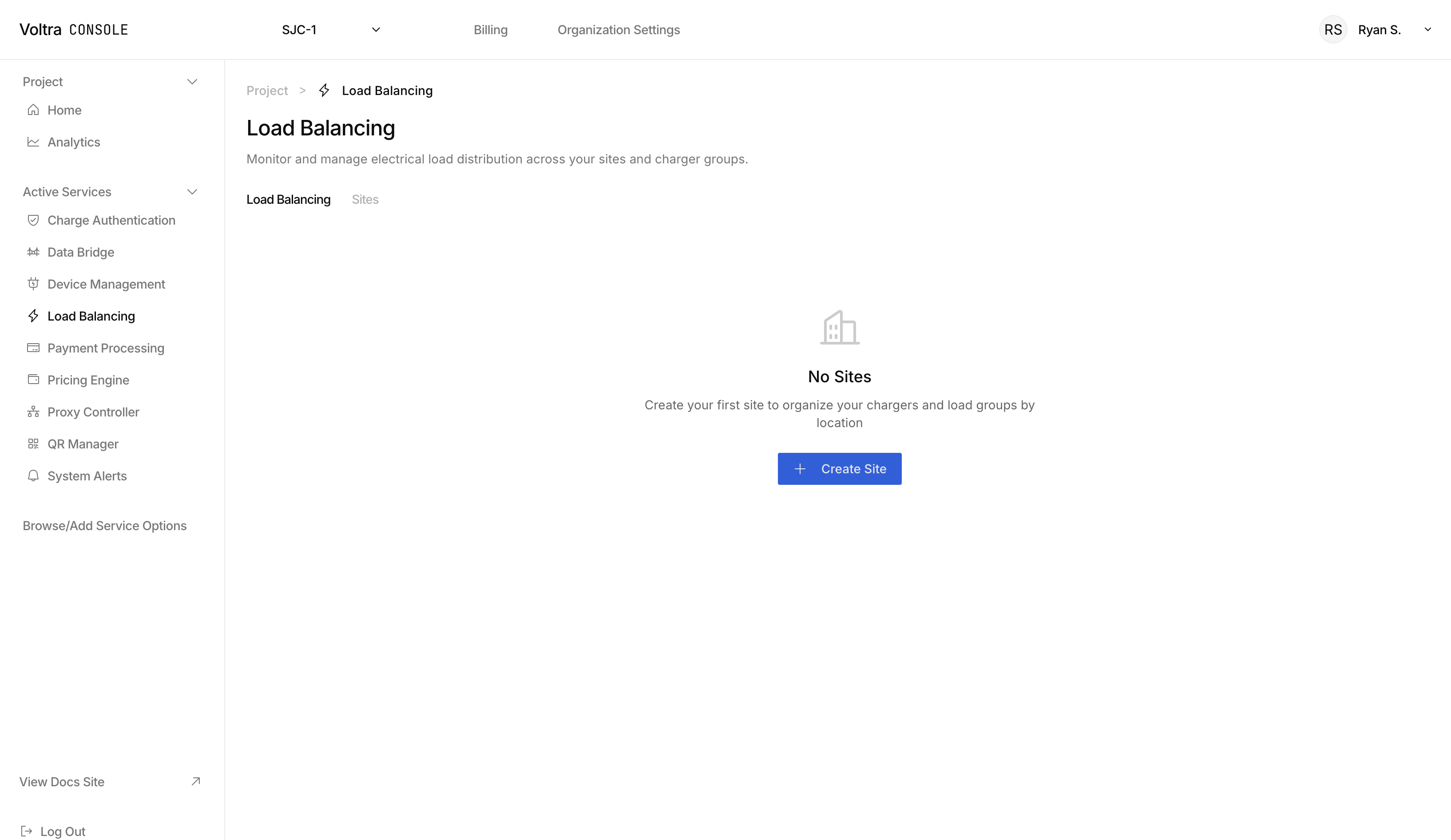
### Create a Site
Sites are physical locations within your facility. You will have a chance later to group chargers in each site.
Click on "+ Create Site" to open the site modal and fill in the location and site specific information
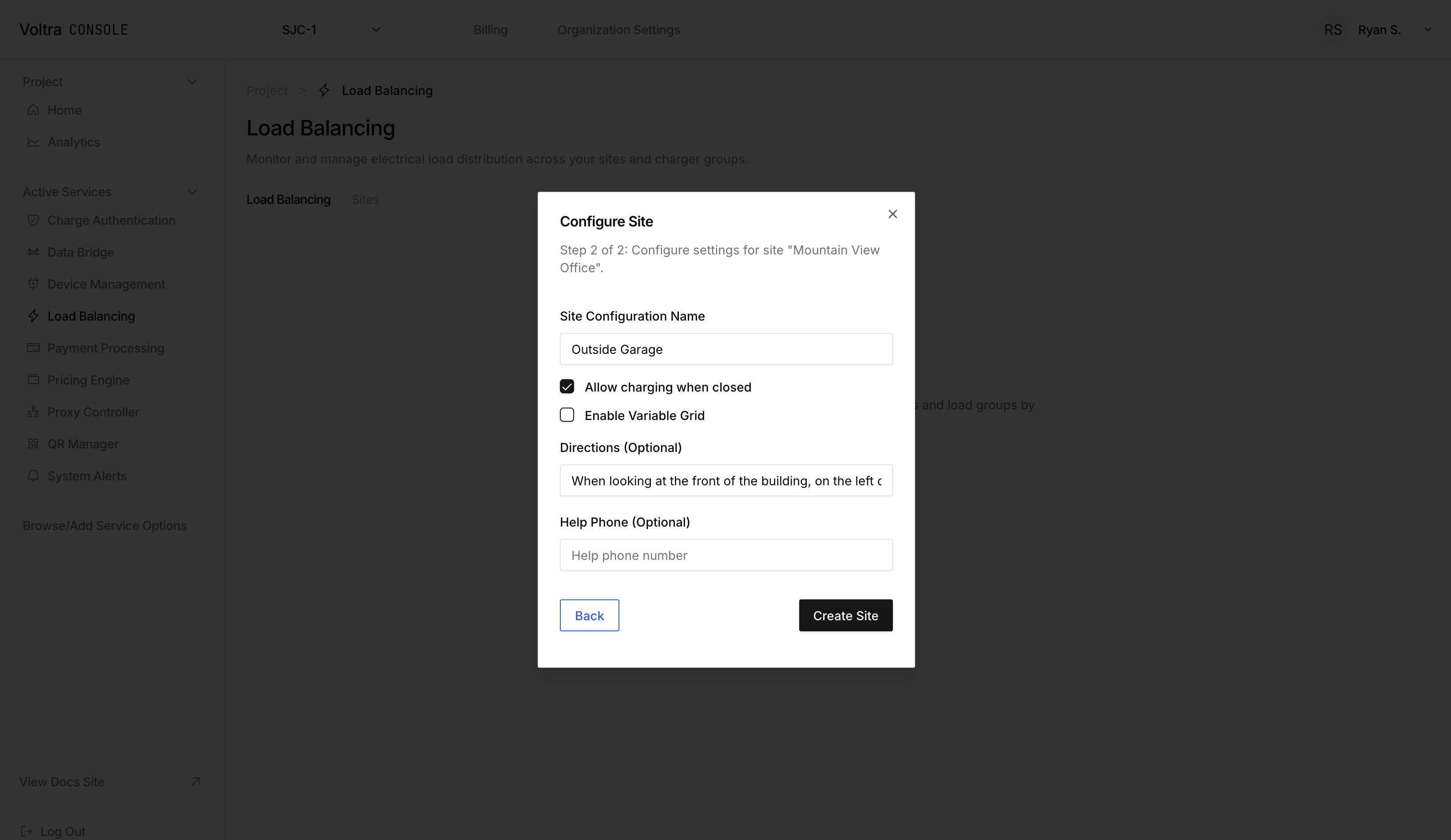
When complete, your site will appear on the Load Balancing page
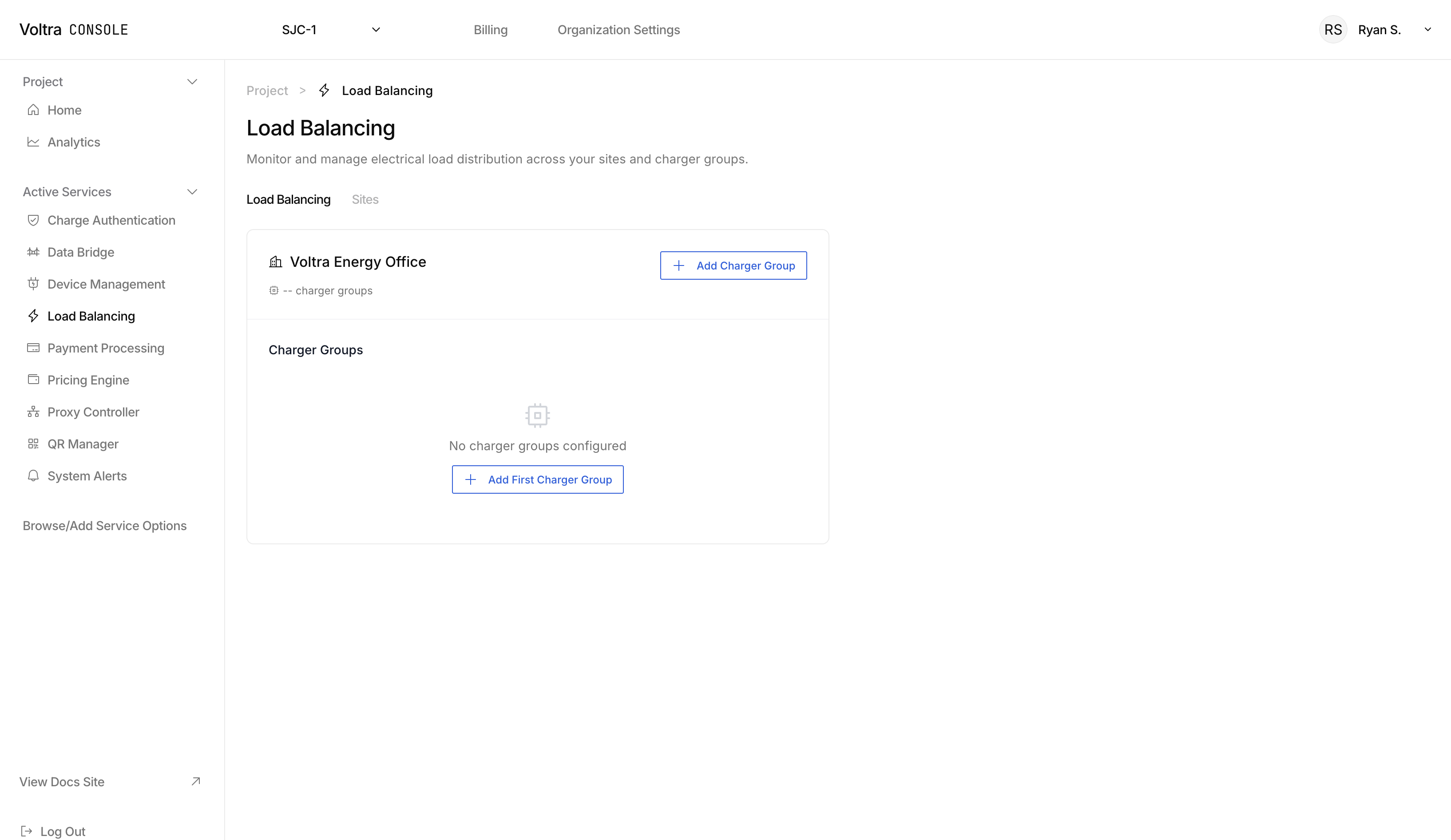
### Add a Charger Group to a Site
Click on "+ Add Charger Group" to create a charger group that you want to load balance.
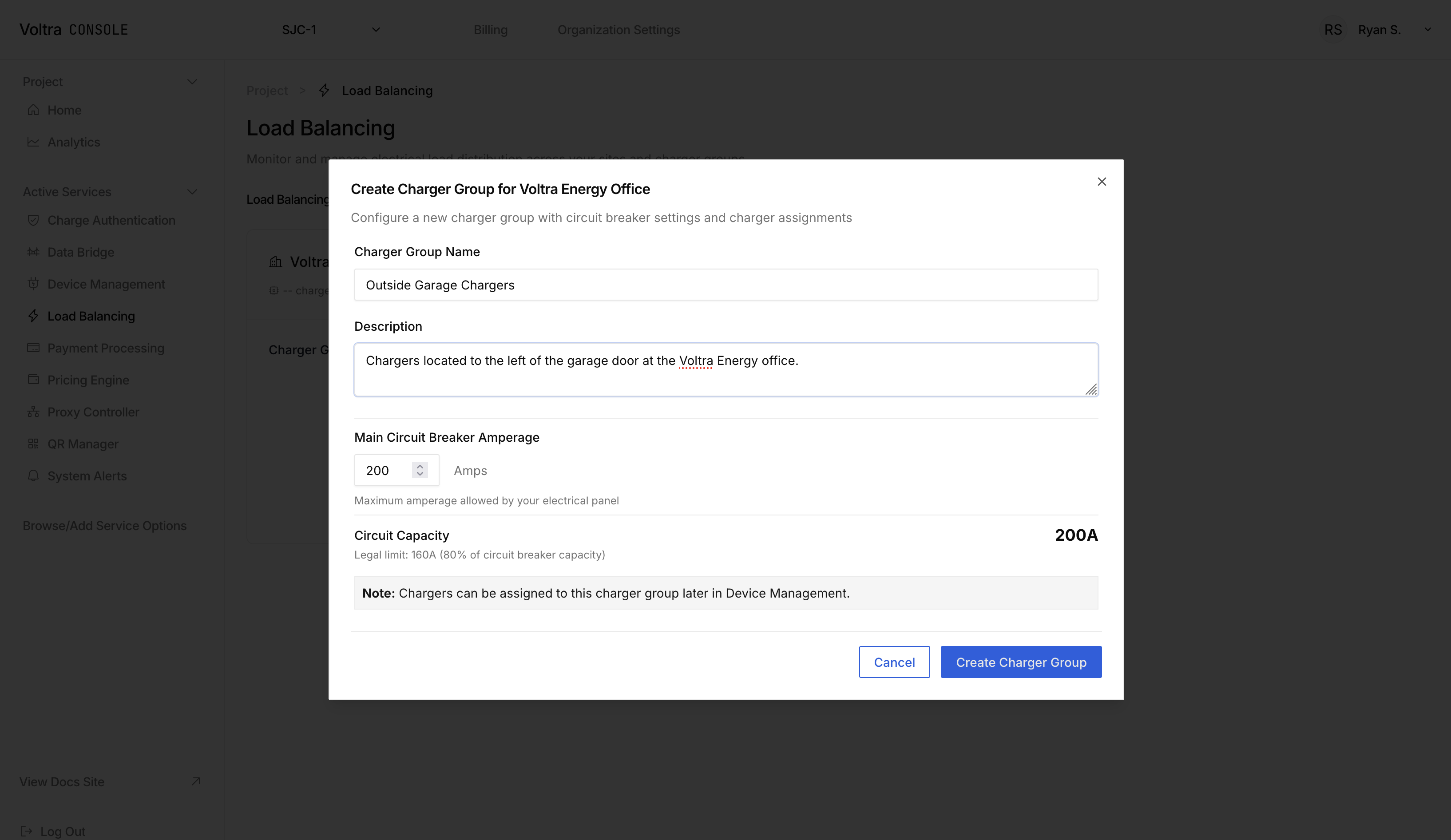
### Assign Chargers to Charger Group
After creating a charger group, click on the charger group and a sidebar will open. Click on "+ Add Charger" in the side bar to add chargers to the group.
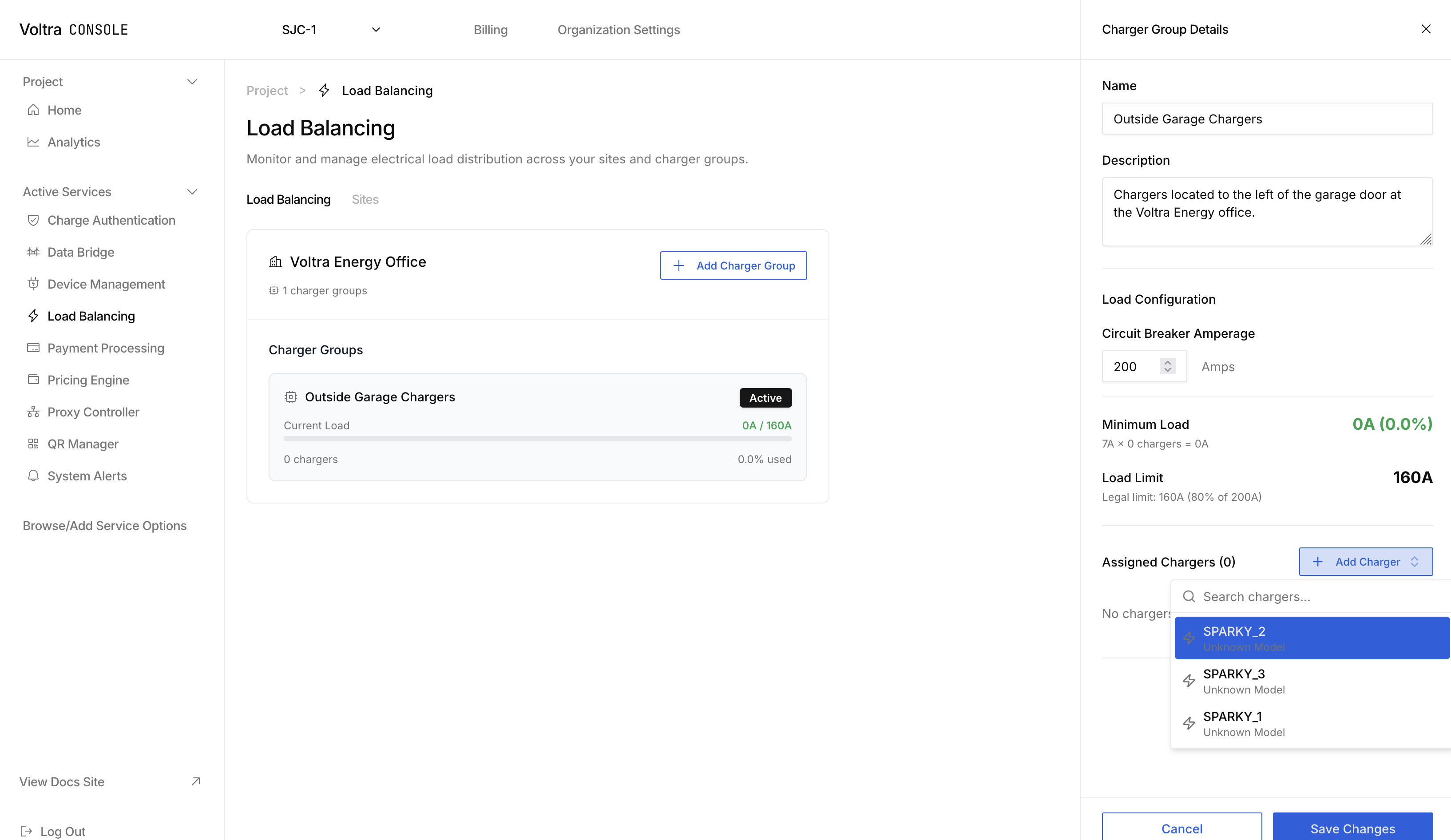
The load strategy and any load strategy parameters can be configured from this sidebar.
## Next Steps
Investigate the load management strategy that is right for you and your fleet at [Load Group Strategies](./load-group-strategies).
---
## Load Group Strategies
URL: https://docs.voltra.com/docs/Services/LoadManagement/load-group-strategies
# Load Group Strategies
Documentation coming soon.
## Have Questions?
Contact [hello@voltra.com](emailto:hello@voltra.com) to get answers.
---
## Locations
URL: https://docs.voltra.com/docs/Services/Locations
# Locations
The location data model is used by various services like Load Management and OCPI in Voltra's CEC. The API's in this documentation are provided for your utility.
---
## Payment Processing
URL: https://docs.voltra.com/docs/Services/PaymentProcessing
# Payment Processing
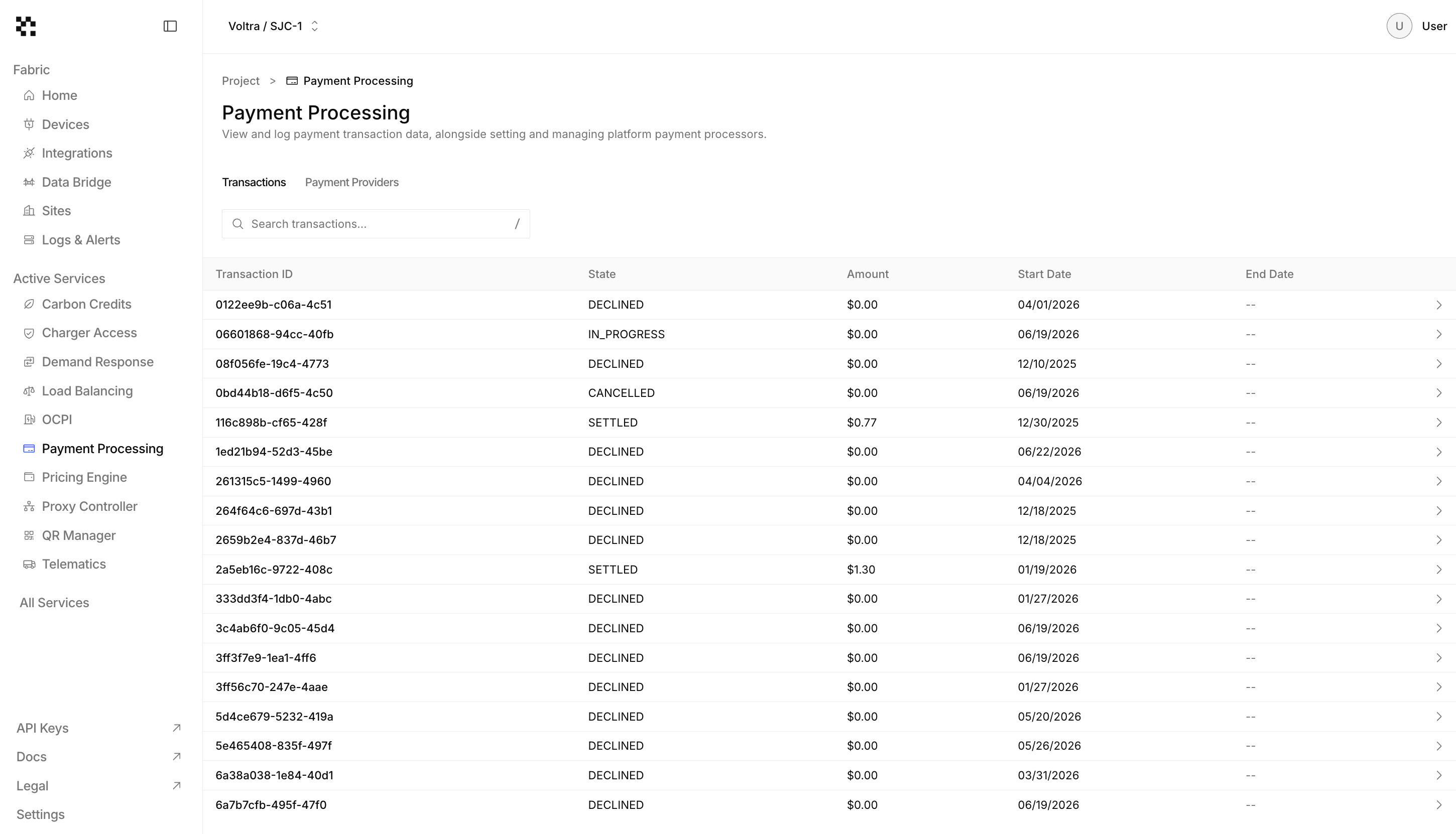
Use your choice of payment providers for collecting payments from your users. Payment Processing is a payment provider agnostic solution so you can use your preferred payment platform with our software.
## Use Cases
- **EV Charging Payments**: Use our white-labelled payment portal to accept payments from EVs charging on your chargers.
- **Track Transactions**: Use the transaction data and uncover payment patterns to set competitive prices.
---
## Connecting a Payment Provider
URL: https://docs.voltra.com/docs/Services/PaymentProcessing/connecting-a-payment-provider
# Connecting a Payment Provider
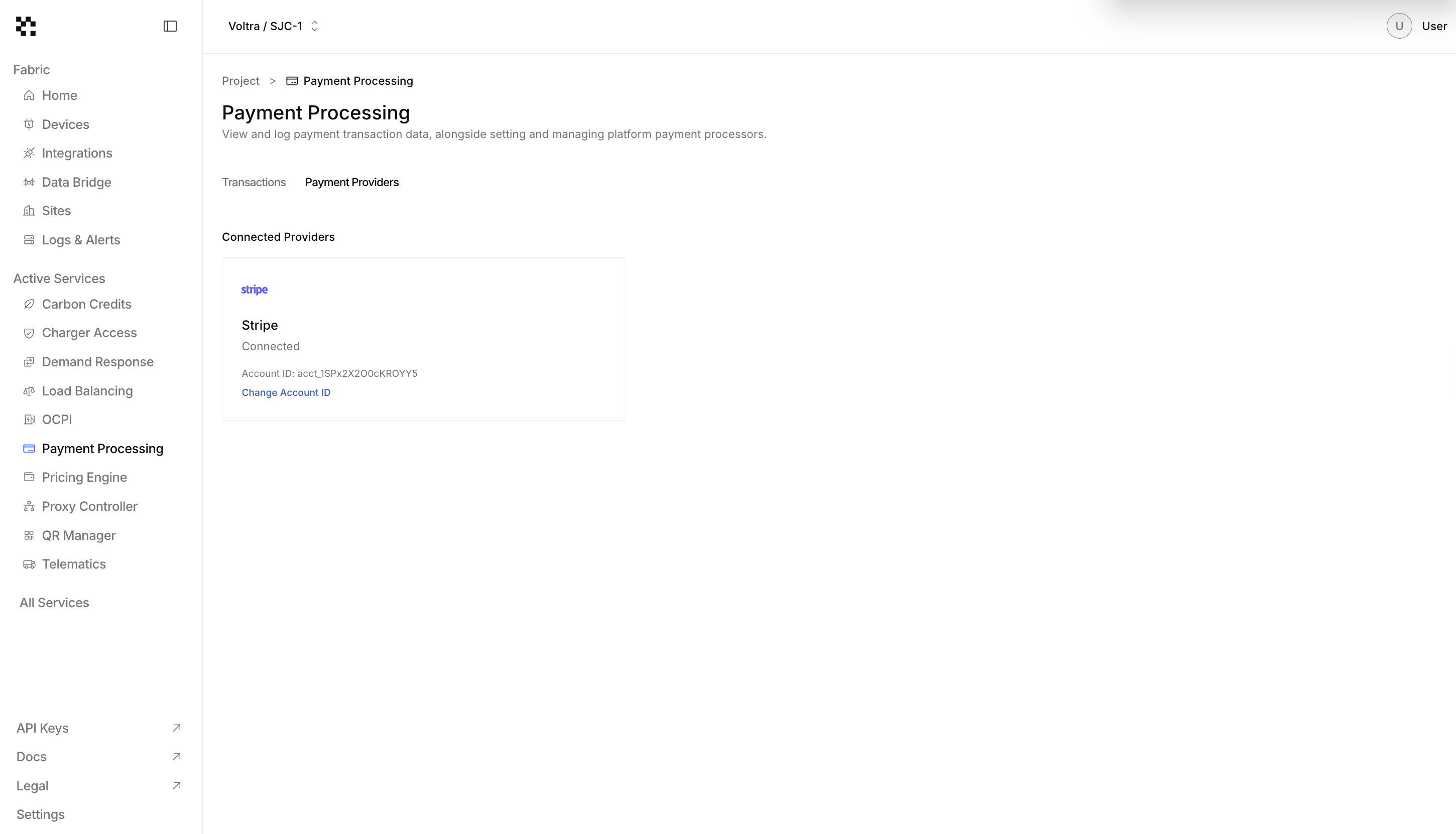
To connect a payment provider, contact [hello@voltra.com](mailto:hello@voltra.com). We will facilitate creating your payment account and giving your payment account ID.
**Coming Soon**
We're adding the capability to enter the payment account information yourself.
---
## About
URL: https://docs.voltra.com/docs/Services/PricingEngine
# About
Voltra's Pricing Engine is real-time pricing platform that. This sophisticated system enables sophisticated pricing strategies.
## Key Features
- **Schedule Pricing Poilicies**: Want to charge EV users for using your chargers from 9-5 but make charging free otherwise? Set schedules based on time of day and day of the week.
- **kWh Based Pricing Policies**: Charge your users based on their usage.
- **Time Based Pricing Policies**: Charge your users based on how long they are plugged in to your charger.
- **Flat Fees**: Charge a flat fee for using your charger.
## Try it Out
Start by [Creating a Pricing Policy](./creating-a-pricing-policy).
---
## Creating A Pricing Policy
URL: https://docs.voltra.com/docs/Services/PricingEngine/creating-a-pricing-policy
# Creating A Pricing Policy
Pricing policies are the fundamental data model for setting users the price. Begin by visiting the [Pricing Engine page](https://console.voltra.com/dashboard/pricing-engine).
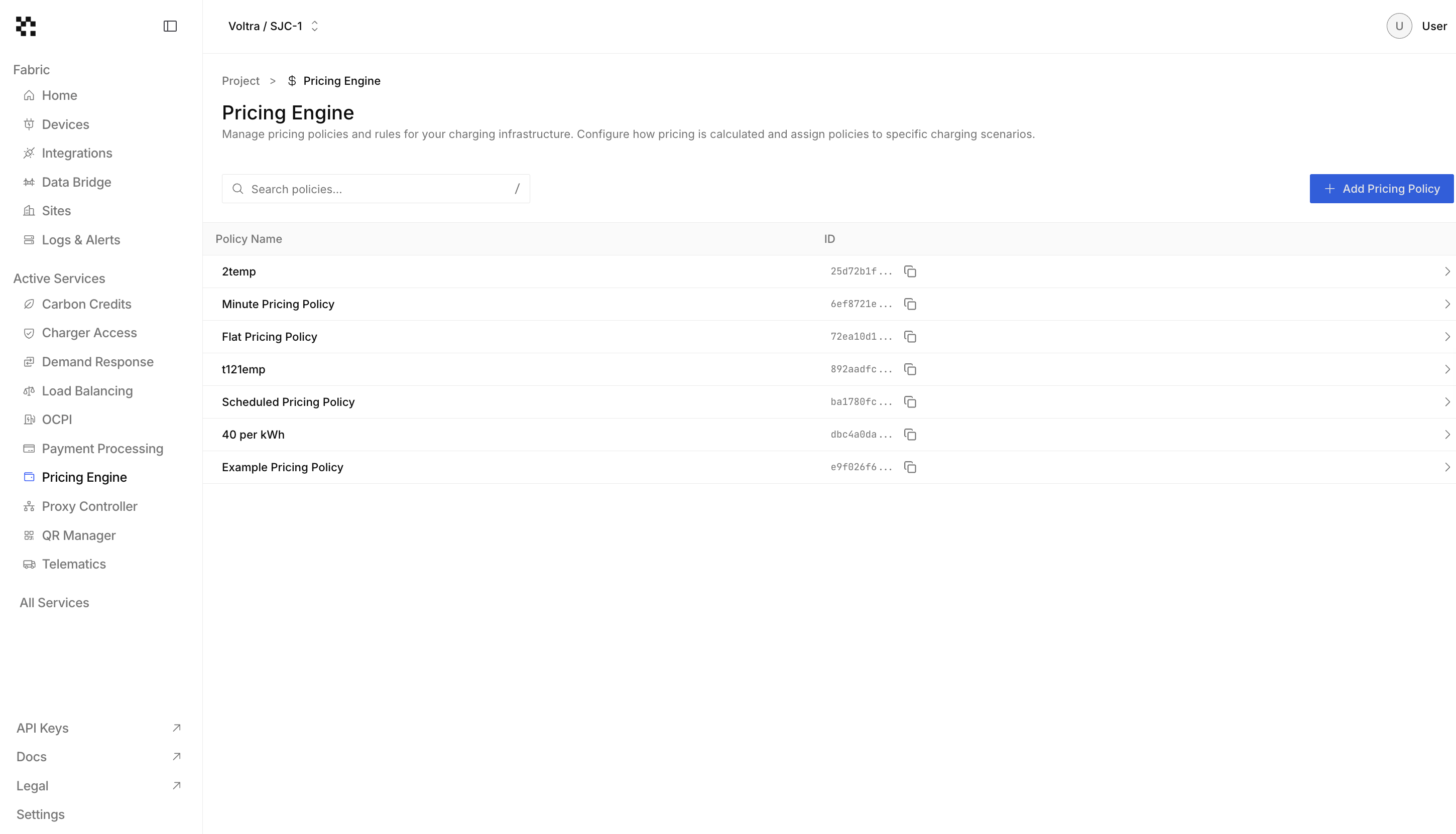
Click on the "+ Add Pricing Policy" button to open the "Create New Pricing Policy Modal". You can create complex policies to suit your pricing needs.
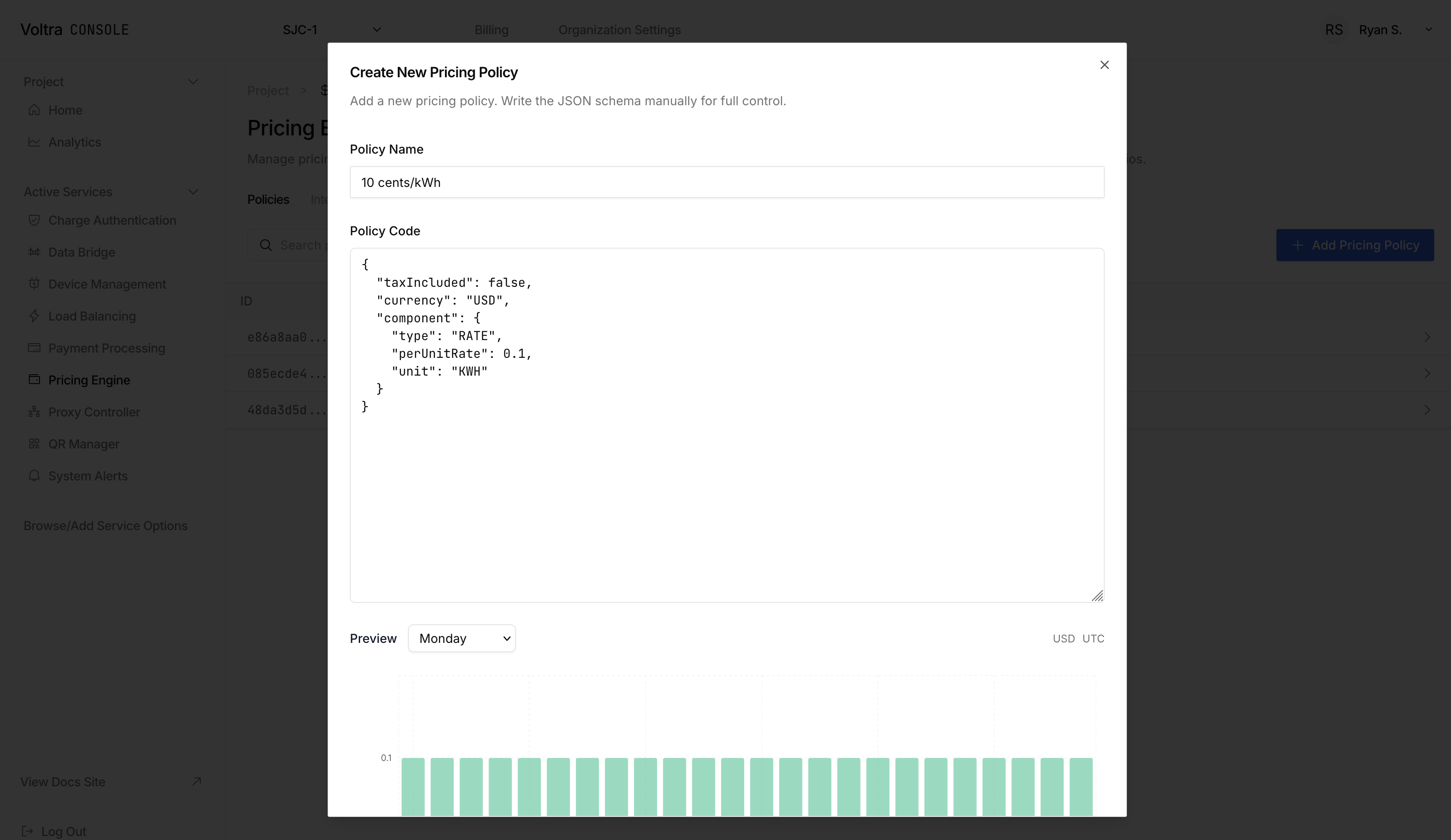
Below are some example pricing policies you can create:
### Flat Pricing Policy
```json
{
"currency": "USD",
"component": {
"type": "FLAT",
"amount": 5,
"description": "Base fee"
},
"taxIncluded": false
}
```
### KWh Rate Pricing Policy
```json
{
"taxIncluded": false,
"currency": "USD",
"component": {
"type": "RATE",
"perUnitRate": 0.1,
"unit": "KWH"
}
}
```
### Minute Rate Pricing Policy
```json
{
"currency": "USD",
"component": {
"type": "RATE",
"unit": "MINUTE",
"perUnitRate": 0.1
},
"taxIncluded": true
}
```
## Schedule Based Pricing Policies
Use each of the components listed above to create a schedule based pricing policy. Use the below as a references for what you can create:
```json
{
"currency": "USD",
"fallback": {
"type": "FLAT",
"amount": 3,
"description": "Default fallback fee"
},
"timezone": "America/Los_Angeles",
"schedules": [
{
"endTime": "17:00",
"component": {
"type": "RATE",
"unit": "KWH",
"description": "Rate per KWH",
"perUnitRate": 1.5
},
"startTime": "09:00",
"daysOfWeek": [
"MONDAY",
"TUESDAY",
"WEDNESDAY",
"THURSDAY",
"FRIDAY"
]
},
{
"endTime": "18:00",
"component": {
"type": "FLAT",
"amount": 5,
"description": "Base fee"
},
"startTime": "06:00",
"daysOfWeek": [
"SATURDAY",
"SUNDAY"
]
}
],
"taxIncluded": true
}
```
### Caveats
#### Time Ranges
Each time range of a pricing policy cannot span past midnight. This is so that we can be consistent and clear for not only creating pricing policies, but displaying prices to your users.
## Assigning a Pricing Policy to a Charger
Visit the [Device Management Page](https://console.voltra.com/dashboard/device-management).
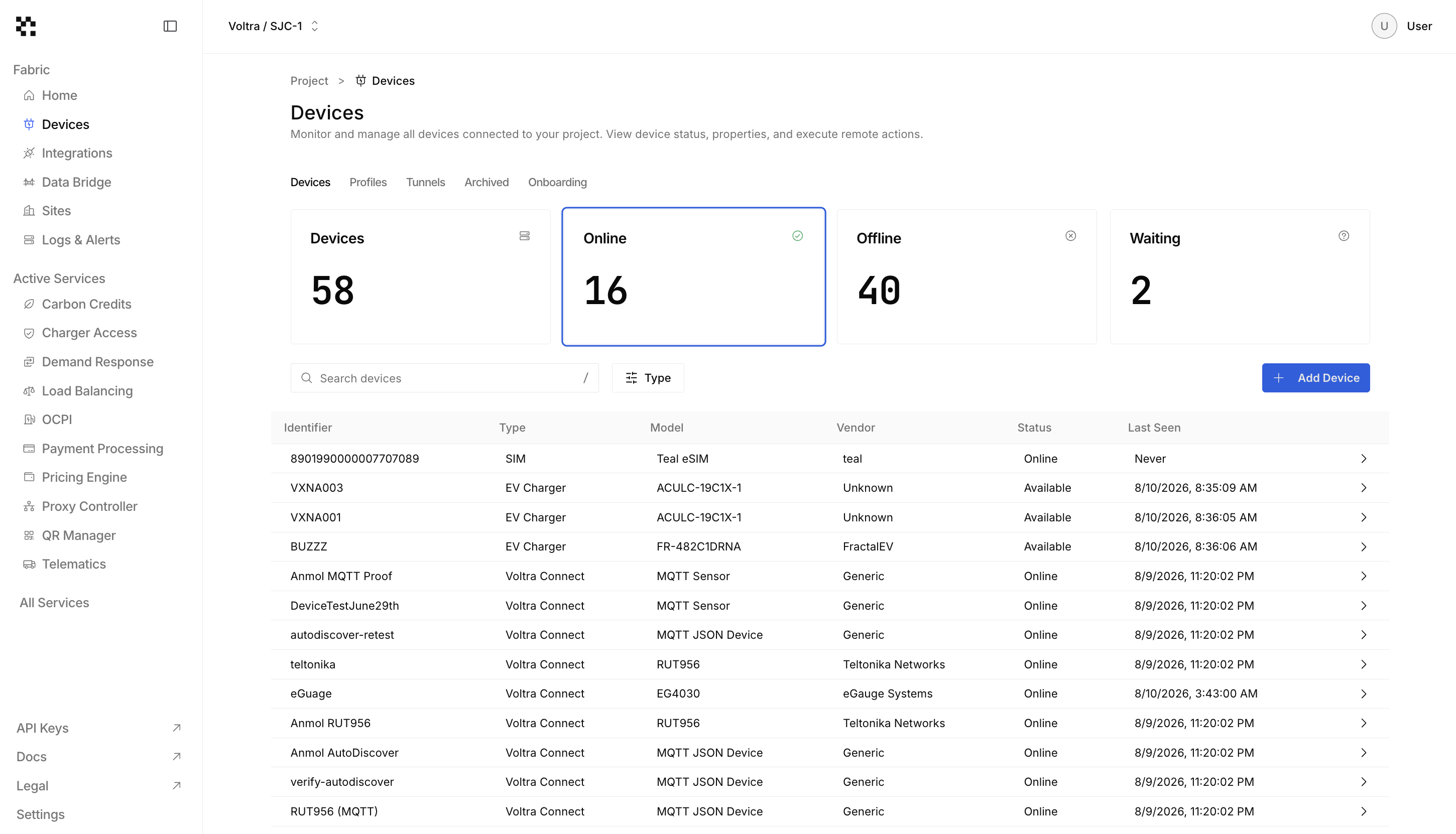
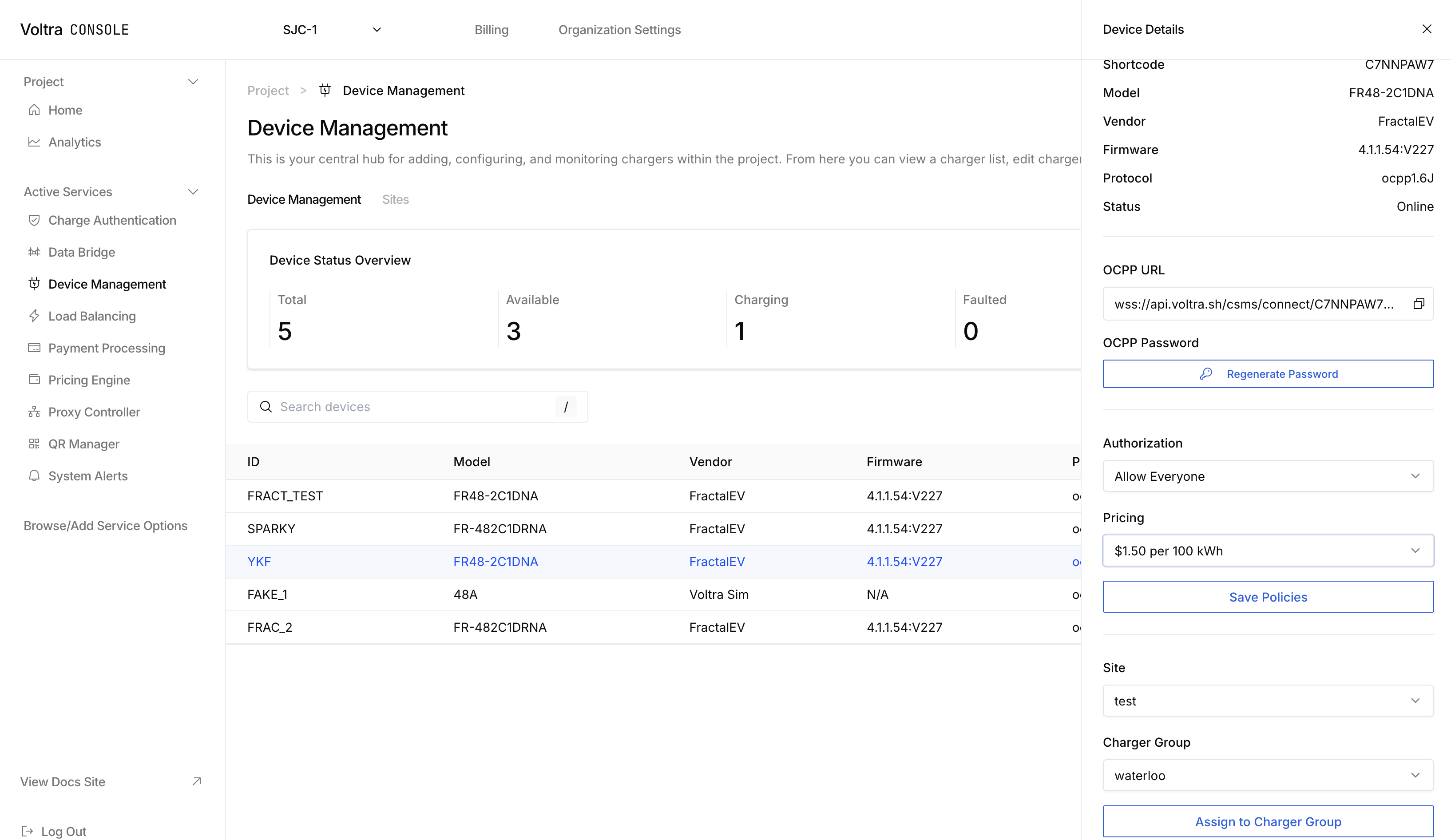
Click on the charger you want to assign the pricing policy to. There is a "Pricing" dropdown where you can select the pricing policy you created. After selecting the pricing policy, click on "Save Policies" to save the pricing policy.
## Further Customization
Need a different pricing strategy? Trying to pull in data like energy prices into your pricing policy? Contact [hello@voltra.com](emailto:hello@voltra.com) for special inquiries.
---
## Proxy Configuration
URL: https://docs.voltra.com/docs/Services/Proxy
# Proxy Configuration
Configure proxy settings for device communication in Voltra.
---
## QR Code Manager
URL: https://docs.voltra.com/docs/Services/QRCodeManager
# QR Code Manager
Manage QR codes for your charging stations in Voltra.
---
## Vantage Overview
URL: https://docs.voltra.com/docs/Vantage
# Vantage Overview
Vantage is Voltra's AI services platform designed to run seamlessly across the entire Voltra stack. Vantage brings generative AI capabilities to your charging infrastructure operations.
## Capabilities
### Generative UI
Dynamically generate user interfaces and dashboards based on natural language queries.
- Ask questions in plain English
- Get instant visualizations
- Create custom reports on demand
### Logging Analysis
AI-powered log parsing, anomaly detection, and insights.
- Automatic issue detection
- Root cause analysis
- Predictive maintenance alerts
### Code Generation
Accelerate integration development with intelligent code assistance.
- API usage examples
- Integration boilerplate
- Troubleshooting scripts
## Private Preview
Vantage is currently in private preview as we continue to refine and expand its capabilities.
If you're interested in early access or would like to learn more about how Vantage can enhance your operations, please reach out to [developer@voltra.com](mailto:developer@voltra.com).
## Learn More
- [Vantage Product Overview](../Products/vantage) - Product capabilities
- [Vantage API Reference](/api/Vantage) - API documentation (coming soon)
---
## API Reference
URL: https://docs.voltra.com/docs/Vantage/api-reference
# API Reference
Vantage API documentation.
## Status
Vantage APIs are currently in private preview. Full API documentation will be available when Vantage reaches general availability.
## Preview Access
If you're participating in the Vantage private preview, API documentation is available through your preview access portal.
## Learn More
- [Vantage Overview](./) - Platform capabilities
- [Request Access](mailto:developer@voltra.com) - Join the preview program
---